Best OKF Viewers: Seven Tools Compared, and When Each Is Good
Seven ways to read an Open Knowledge Format bundle, compared without a winner: a matrix of what each one does, and which one is good when.
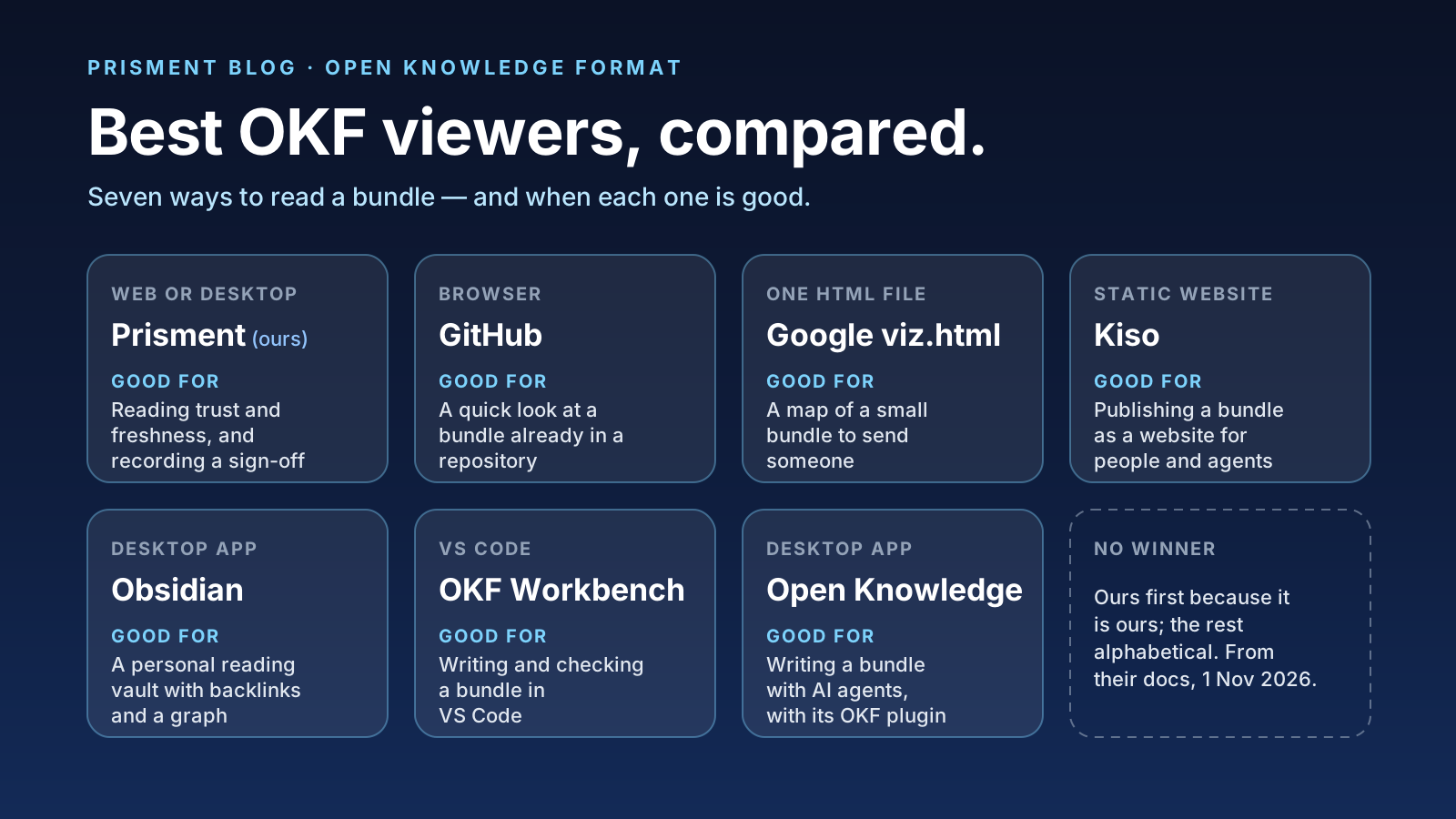
There is no single best OKF viewer: each of these seven is good at a different job, and the matrix below shows which. An Open Knowledge Format bundle is a folder of Markdown files with YAML front matter, so almost anything opens it. Unlike plain notes, its concepts link into a graph and carry provenance, trust tiers and lifecycle metadata. Viewers differ in how much of that structure they understand, and what they do for the reader. One disclosure: we make Prisment, so it comes first; the other six follow alphabetically, and the order is not a ranking.
At a glance: the matrix
Graphs and backlinks are common; trust and freshness labels, command-line checks and an open-source licence are where the seven split.
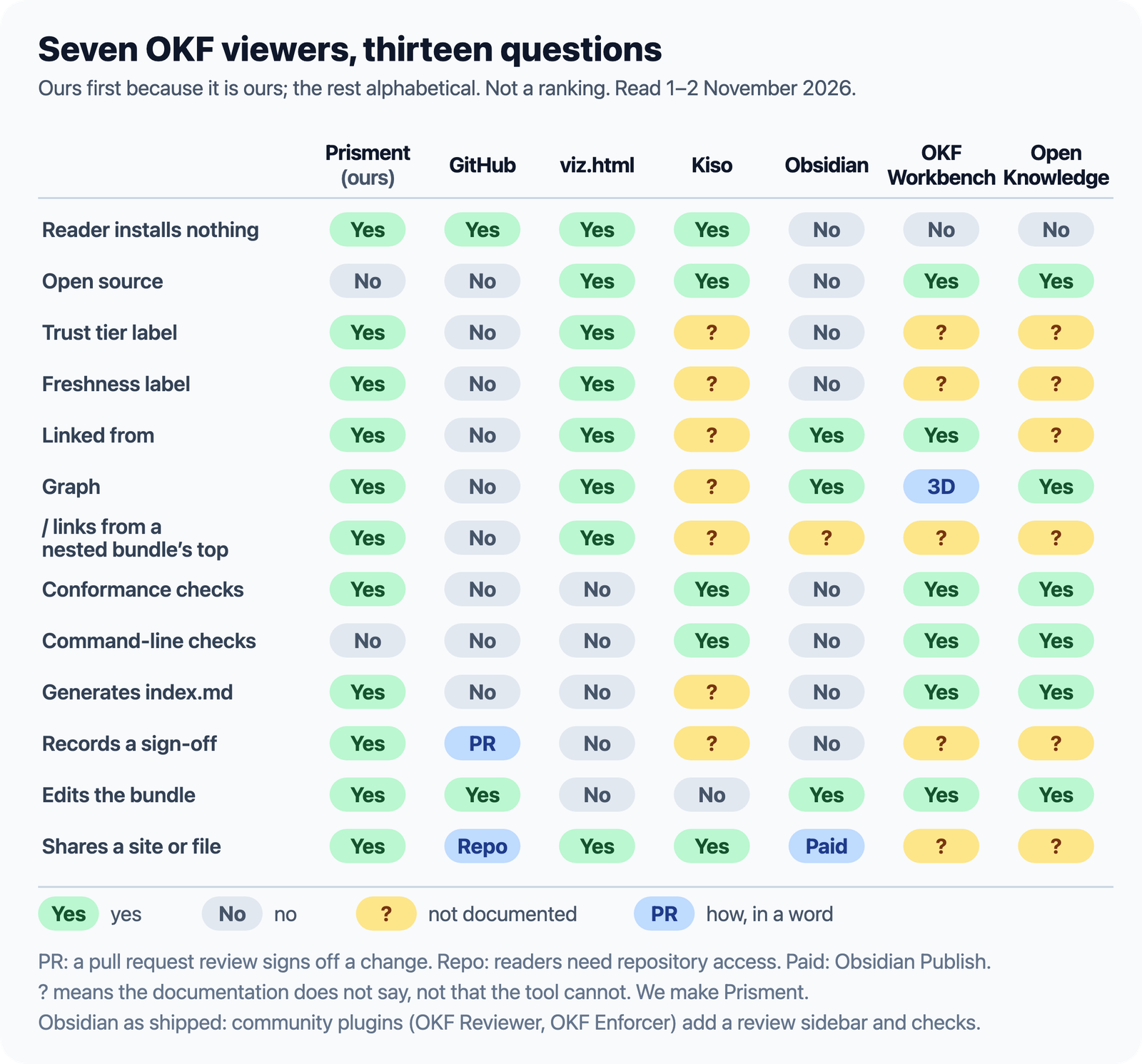
A question mark means the tool's documentation does not say, as of 1–2 November 2026 — not that it cannot. Obsidian is shown as shipped; its community plugins are in its entry.
Prisment
Prisment is good for reading how far to trust each concept and recording who checked it. Each concept opens on a summary line with its type, status, trust tier, Changed since verified and Fresh until or Stale since; a bar lists what it links to and what links to it, and / links are read from the bundle's top — even for a bundle that never wrote okf_version, as Google's own reference bundles are. Verify writes your own human: entry into a concept's verified list, and Withdraw takes it out. On a folder, Create or Update index.md shows every line first and only ever adds. Review lists questions — a stale concept, one changed since it was verified, a deprecated one still linked — for a person to decide, saved beside the files. It exports an HTML bundle that readers open with nothing installed.
Good when: someone has to judge whether the bundle can be trusted, or the bundle lives in a repository subfolder. Not the pick when: you want a CI check or open source — it has neither — or Review in Firefox or Safari, which needs a folder. Free, no account; we make it.
Link: prisment.io · try the OKF demo
GitHub
GitHub is good for a quick look at a bundle that already lives in a repository. Every concept renders, with its front matter shown as a table, and a pull request review signs off each change.
Good when: the bundle is on GitHub and you just want to read a concept. Not the pick when: the bundle sits in a subfolder — GitHub reads a / link from the repository root, so links break — or when you need backlinks, trust or freshness. Free tier.
Link: github.com
Google's viz.html
The reference toolkit's visualizer is good for sending someone a map of a small bundle. Generated by the official Python CLI, it writes a single self-contained HTML file: an interactive Cytoscape.js graph coloured by type, a side panel with each concept's description and tags and a badge for its status, trust tier and staleness, a Cited by list, search and a type filter.
Good when: the reader should install nothing and you want a picture of the whole bundle. Not the pick when: you need to edit or check it — it is read-only, made with the Python toolkit, loads its libraries from a CDN, and okf.md says it slows past about 500 concepts. Apache-2.0.
Link: GoogleCloudPlatform/open-knowledge-format
Kiso
Kiso is good for publishing a bundle as a static website for people and AI agents. check validates the bundle and build makes the site, with an llms.txt and a sitemap; a GitHub Action runs it in CI, and a built-in MCP server lets AI agents query the bundle.
Good when: the bundle should be a public site, checked on every push. Not the pick when: you want to read or edit interactively — it is a build step, on Java 25 or a native binary, and its documentation does not say what a page shows of trust or backlinks. Apache-2.0.
Link: oak-invest/kiso
Obsidian
Obsidian is good as a personal reading vault: open the bundle's folder and you get backlinks and a graph. okf.md calls it compatible by design.
Good when: you read and annotate for yourself. Not the pick when: you want OKF meaning built in — out of the box, front matter shows as properties without trust tiers or freshness states — or want to share without paying for Obsidian Publish, $8 a month per site billed yearly. okf.md lists no official plugin, but two community ones exist: OKF Reviewer, a sidebar that shows the trust tier and a due-for-review flag and records a verification (installed by hand), and OKF Enforcer, which checks notes against the spec. Free for any use; not open source.
Link: obsidian.md
OKF Workbench
OKF Workbench is good for authors who write their bundle in VS Code. Backed by a local Rust and Wasm CLI, it shows conformance apart from curation in the Problems panel, an interactive 3D graph filtered by type, tag and folder, backlinks and orphans, concept templates, and a v0.1 to v0.2 migration.
Good when: you author and maintain the bundle in VS Code. Not the pick when: the reader does not use VS Code. Young, and not yet listed on okf.md. MIT.
Link: koizumikento/okf-workbench
Open Knowledge with its OKF plugin
Inkeep's Open Knowledge is good for teams writing a bundle alongside AI agents. Built as a local-first AI markdown IDE with an MCP server, its OKF plugin checks rule sets from required types to provenance and lifecycle fields, warning in real time in the editor and in ok lint.
Good when: people and agents write the bundle together and want feedback as they go. Not the pick when: you need to see trust or freshness as a label — its documentation does not say it shows one. GPL-3.0 and free, for macOS, Windows and Linux.
Link: openknowledge.ai · inkeep/open-knowledge
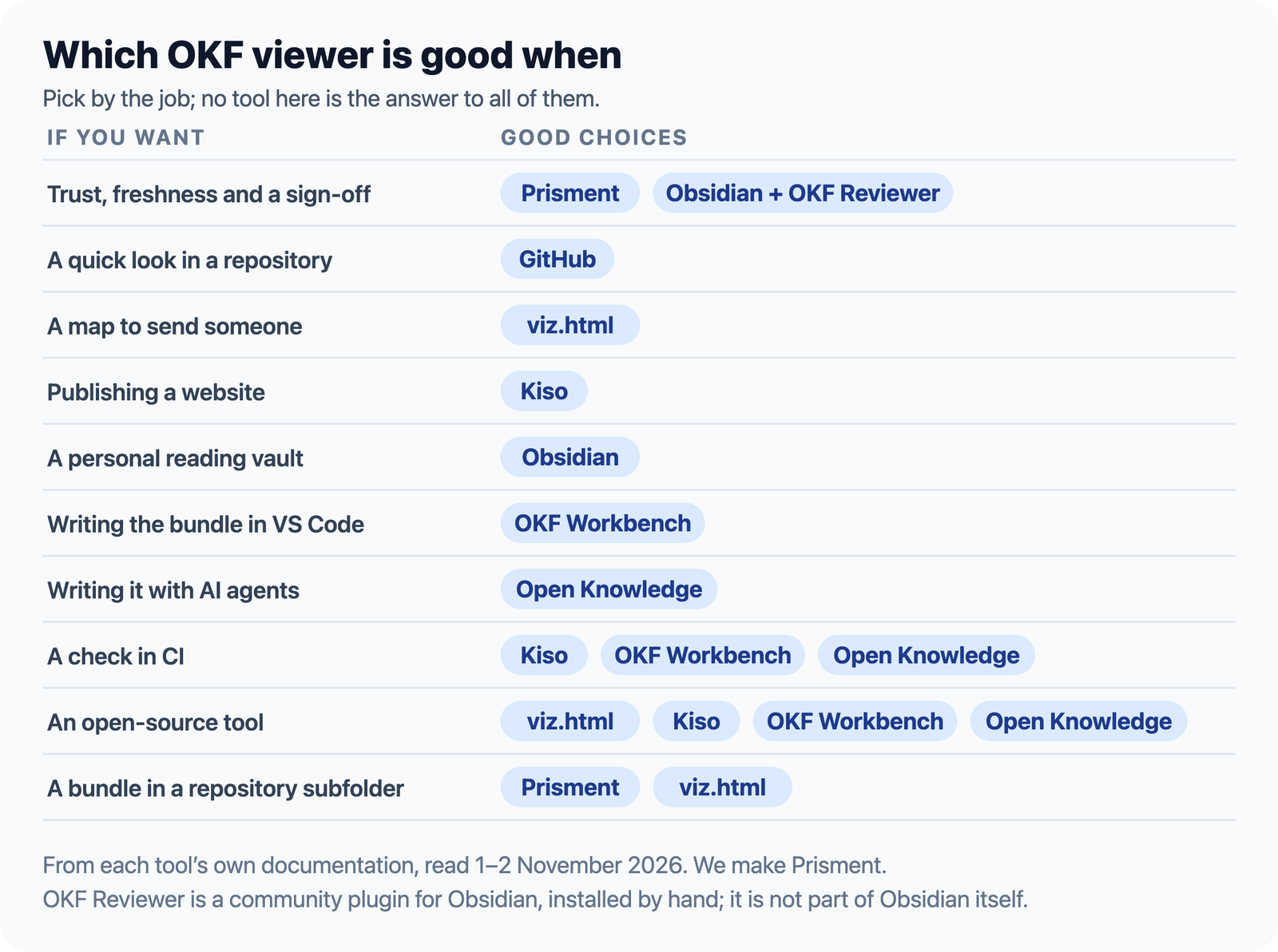
Which one is good when?
Pick by the job in front of you; no tool here is the right answer to all of them.
How we compared them
From each tool's own README, website or documentation and okf.md's inventory, read on 1 and 2 November 2026, with no overall winner: ours first because it is ours, the rest alphabetically. We read the others' documentation and did not run them all; Prisment's cells come from its user guide and from running it. viz.html's trust and freshness cells are from the viz.html files beside Google's reference bundles; its README omits them. Left out of the main matrix: OKF Studio, a free desktop reader that sets a graph, treemap or sunburst beside a reader and an agent (no macOS build yet), young viewers such as OKPH, Groma and Akasha, headless validators like okflint and OKForest, and hosted workspaces whose OKF support okf.md marks unconfirmed. If anything here is out of date, tell us and we will fix it. Prisment is independent of Google and the OKF project.
Frequently asked questions
What is the best OKF viewer?
There is no single best one; it depends on the job. GitHub for a quick look in a repository, Google's viz.html for a map to send, Kiso to publish a website, Obsidian for a personal vault, OKF Workbench to write in VS Code, Open Knowledge with its OKF plugin to write with AI agents, and Prisment to read trust and freshness and record a sign-off (Obsidian does too, with a community plugin). This comparison is by the makers of Prisment, from each tool's own documentation on 1 and 2 November 2026.
Which OKF viewers are open source?
Of the seven compared, Google's viz.html and Kiso are Apache-2.0, OKF Workbench is MIT and Open Knowledge is GPL-3.0. GitHub, Obsidian and Prisment are not open source.
Can I read an OKF bundle on GitHub?
Yes. GitHub renders each concept and shows its front matter as a table. It reads a link that starts with a slash from the repository's root, though, so links in a bundle kept in a subfolder such as docs/okf break, and it shows no backlinks, trust tier or freshness.
Why do links starting with a slash break in GitHub?
Markdown links starting with / are designed to resolve from the bundle's root. Generic repository viewers like GitHub resolve them from the git repository root instead, so links inside a subfolder such as docs/okf/ or knowledge/ point to the wrong repository location and 404.
Which OKF viewer shows trust tiers and freshness?
Of the seven tools compared on 1 and 2 November 2026, two show both. Prisment opens each concept on a label for its trust tier, read from verified, and for its stale_after date, and lists the stale ones for a person to decide. Google's viz.html draws a status, trust-tier and stale badge in the panel of the concept you select; its README does not list them, but the viz.html files Google publishes beside its reference bundles show them. The documentation of the other five does not say whether they show either; Obsidian does with the community OKF Reviewer plugin.
Which OKF viewers check a bundle for conformance?
OKF Workbench reports conformance in VS Code's Problems panel, Inkeep's Open Knowledge with its OKF plugin warns as you write, Kiso checks before it builds a site, and Prisment's Review lists issues and questions. For a CI gate, Kiso, OKF Workbench and Open Knowledge run from a command line, and so do validators such as okflint and OKForest.
What other tools exist in the OKF ecosystem?
Beyond the seven viewers compared here, the ecosystem includes OKF Studio (a free, MIT-licensed desktop reader built with Tauri, with graph, treemap and sunburst views and changes you review before they are applied; Windows and Linux builds, macOS from source), OKPH (a Mermaid graph and a check of what a branch may affect), Groma (live maps of C4 architecture bundles), headless CLI validators such as okflint and OKForest, and okf-mcp for connecting AI models to bundles via the Model Context Protocol.