Looks Good to Me? Approve the Plan Before the AI Builds It
LGTM is what gets typed on code nobody read. Say it on the plan instead, with a yes that names the exact versions you read and lapses when one changes.
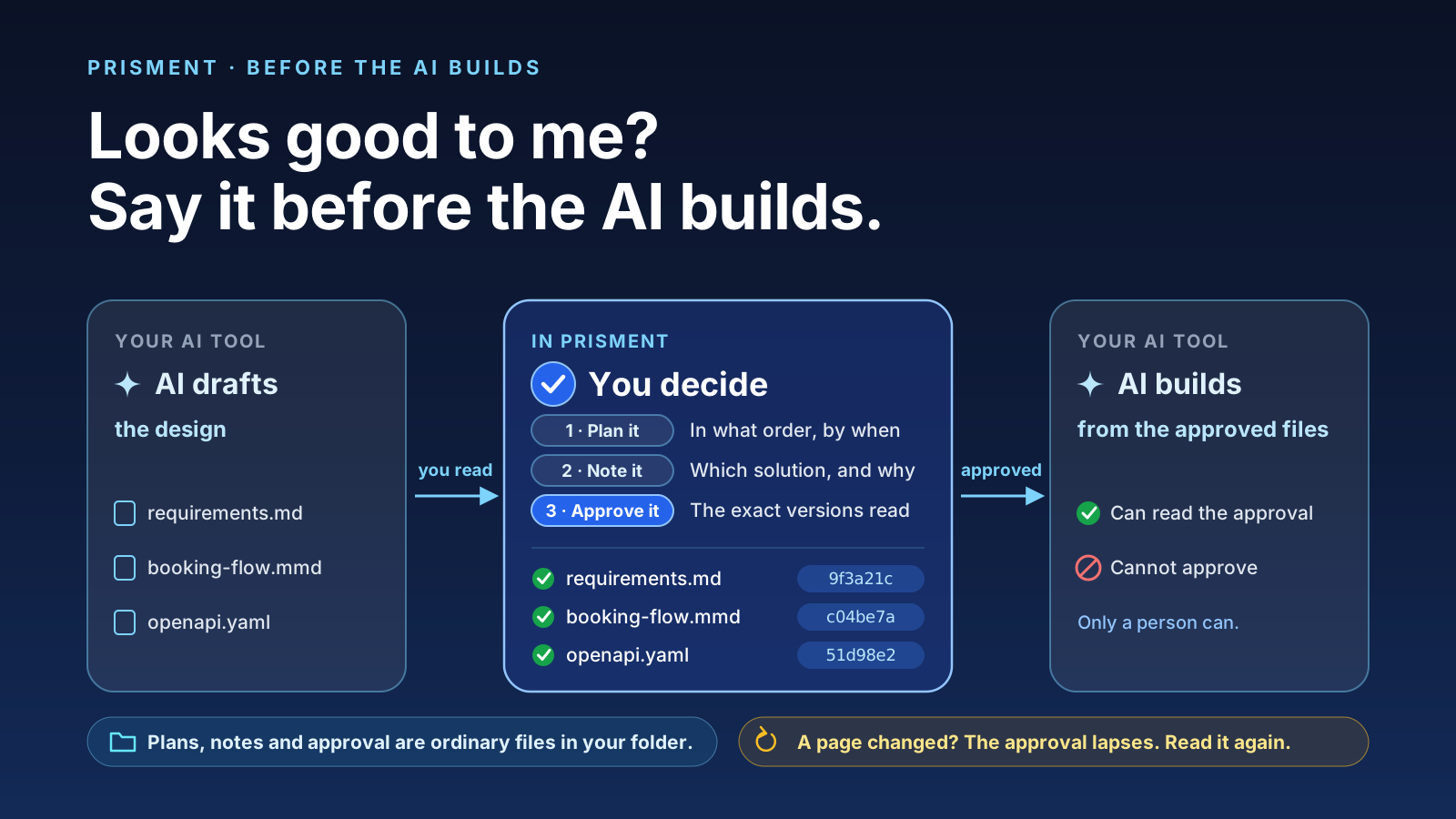
Say "looks good to me" on the plan, before the AI builds, and make the yes name what you read. LGTM is the sign-off typed on work a reviewer accepts, and lately on code nobody had time to read, the joke of a viral music video about AI-first teams. AI work now runs from your vision, to the AI's design, to the build. Once you have talked the design through you know what could be built, and that is the moment to decide. Prisment keeps the decision as ordinary files in your own folder, free and with no account. The sample workspace opens with a plan to try.
1. What does LGTM mean, and why does it fail on AI work?
LGTM means "looks good to me": a reviewer's yes, and it fails when the reviewer could not have read what the AI wrote. Review is the expensive end of AI work, because output arrives faster than anyone reads it. Stack Overflow's 2026 survey found only 6.6% of developers trust AI output for important decisions, and nearly half when they can verify it. The plan is the cheap end: a few pages a person can read in minutes, where a yes can still mean something.
2. What makes a yes worth anything?
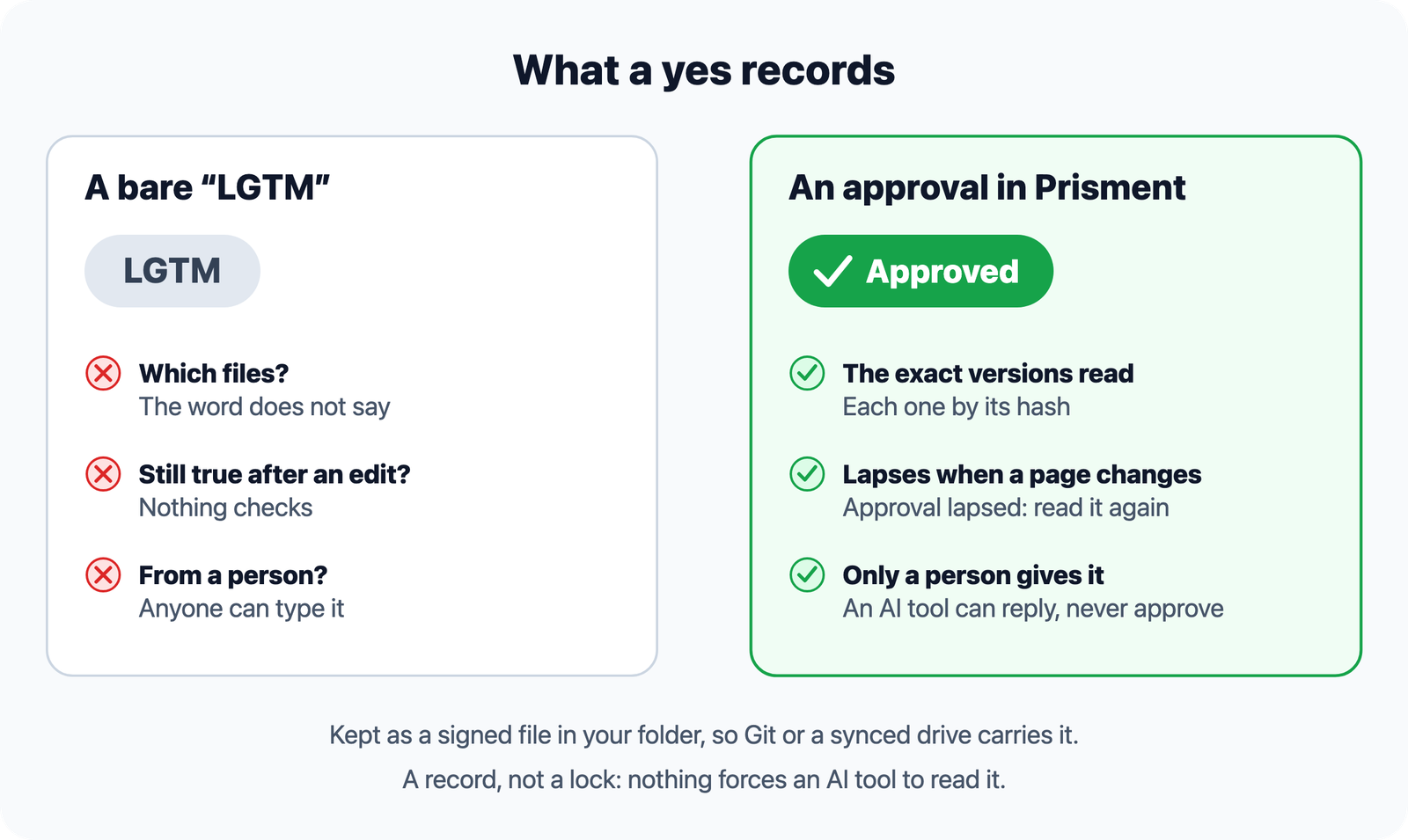
A yes is worth something when it names what was read, lapses when that changes, and comes from a person.
| A yes that counts | What Prisment does |
|---|---|
| Names what was read | An approval covers the exact versions of the documents you read |
| Lapses when they change | Change a document afterwards and the review shows Approval lapsed |
| Comes from a person | An AI tool can reply, shown with (AI), but never resolve, decide or approve |
3. How do you approve a plan before the AI builds it?
Open the folder your AI writes into, read the plan as pages, comment, decide each point, and approve the versions you read.
- Open the folder. Choose Open Local Folder and pick the folder your AI tool writes to.
- Read it as pages and comment. Open the plan, choose Review beside Read and Edit, name the review and select a passage, a table row or a diagram.
- Decide, then approve. Settle each comment, then approve; the approval names the versions you read.
- Plan the work. Put the order, owners and dates in Plans and the options you weighed in Notes. The feature has its own article.
- Let your AI tool read the approval. On the AI tool tab of Share, Install skill lets it check the status and the versions before it builds.
4. What does the AI tool do, and what can it never do?
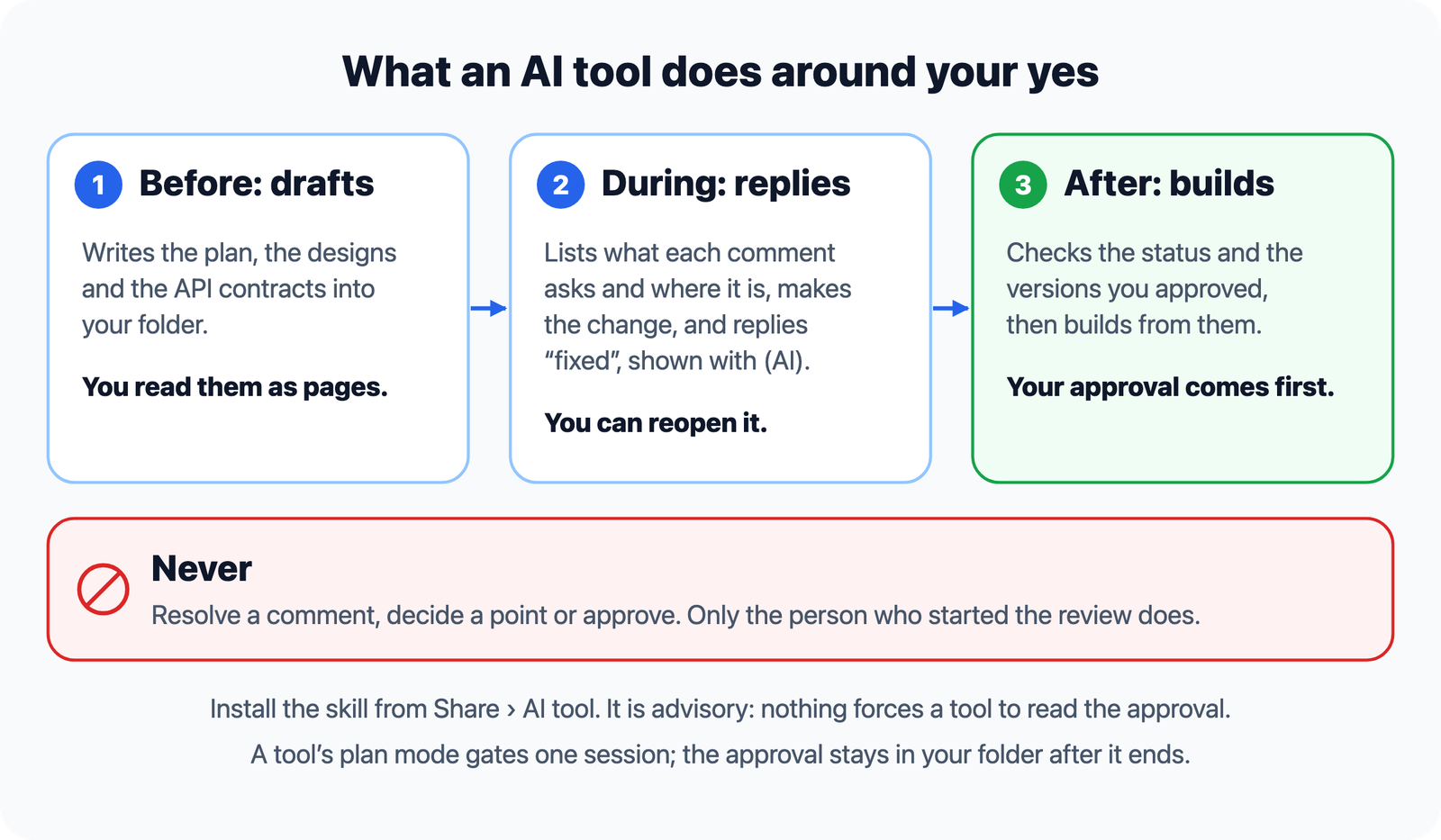
An AI tool drafts before the approval, replies during it and builds after it, and it can never resolve a comment, decide a point or approve. With the skill installed it lists what each open comment asks and the line its passage is on now, makes the change, and replies once it has fixed it, which marks the comment Fixed or Implemented for you to reopen if you disagree. Before it builds it checks the status and the versions. It is a record, not a lock: nothing forces a tool to read it.
5. Does this suit a traditional team as well as one that builds with agents?
Yes: the documents and the sign-off are the same, and only the next reader differs, a colleague or an agent. We build Prisment this way: every change starts as a written change request, the owner decides what it should do, the AI writes the code and its tests, and only the person who asked marks it done. It is the opposite of vibe coding, and the order Claude Code's own guide gives: explore, then plan, then code, because jumping straight to code can solve the wrong problem. Its plan mode keeps edits blocked until you approve the plan, and that gates one session. Prisment keeps the decision as files in your folder after it ends.
| A traditional team | A team that builds with agents | |
|---|---|---|
| What is approved | A requirements or design document, signed off | The same document, now the plan an agent builds from |
| What Prisment gives | Word, PDF and Excel read as they are, a review with approvals, Plans | The same, and a skill that lets the agent check the approval first |
6. Where next?
Plan the work first, then share the decision.
- Plan the work: a Gantt chart and notes in Markdown, the feature in full.
- Share the review with a team: through Git or a synced folder.
- Read what the AI wrote as pages: live previews of an agent's Markdown and a design pack with diagrams and OpenAPI.
- Bring the brief in: Word, PDF and Excel to Markdown and CSV.
- Walk a flow: animated Mermaid diagrams.
- Ask the folder: a local AI assistant, on the desktop.
- Hand it on: one HTML page.
7. Where does this stop?
Prisment records the decision; it does not make it, and it does not build. Approval is advisory, and reviewer names are self-reported, not verified. A review arrives when Git or your drive delivers it, with no live co-editing. Every option is in the guide: Reviewing documents and Plans and notes. Free, no account: open the workspace and start with the booking-app sample.
Frequently asked questions
What does LGTM mean?
LGTM stands for "looks good to me": the sign-off a reviewer types when they accept a change. It is also a warning sign when it is typed on work nobody had time to read, which is the joke of a viral music video about AI-first teams.
How do I approve an AI plan before it builds anything?
Open the folder your AI tool writes to in Prisment, read the plan as rendered pages, start a review, comment on passages, decide each point and approve. The approval names the exact versions you read and lapses if one changes, so the tool can check it before it builds.
What happens to an approval if the plan changes afterwards?
It lapses. An approval covers the exact versions of the documents you read, each by its hash, so a document changed afterwards is no longer what was approved. The review shows Approval lapsed and asks you to read it again before you approve the new version.
Can an AI tool approve a Prisment review?
No. With the review skill installed, an AI tool can list what each comment asks and reply once it has made a change, shown with (AI). It can never resolve a comment, decide a point or approve. Only the person who started the review approves, and approval is advisory: nothing forces an agent to read it.
Does an approval stop an AI tool from building?
No. Approval is a record, not a lock: nothing forces an AI tool to read it. With the review skill installed the tool can check the status and the approved versions before it builds, which is the reason to record the yes, and the approval stays a signed file in your folder either way.
Is Prisment only for teams that build with AI agents?
No. Prisment reads and reviews documents whoever wrote them. A traditional team uses it to read a requirements or design document, record who approved which version and plan the dated work; a team that builds with agents uses the same plan and approval as the instruction an agent builds from, and the review skill lets the agent check the approval first.
Does Prisment need an account or send my plan to a server?
No. A review is written as files in your own folder, and Prisment has no cloud storage or accounts for it; Git or a synced folder carries it if you choose. That is about your documents; the hosted website separately uses aggregate analytics, which the privacy policy describes.