Review Documents With Your Team Through Git: Reviews That Travel in Your Repository BETA
A Prisment review is a set of files in your folder, so Git, OneDrive or Google Drive carries its comments, decisions and approval to your team and your AI agent.
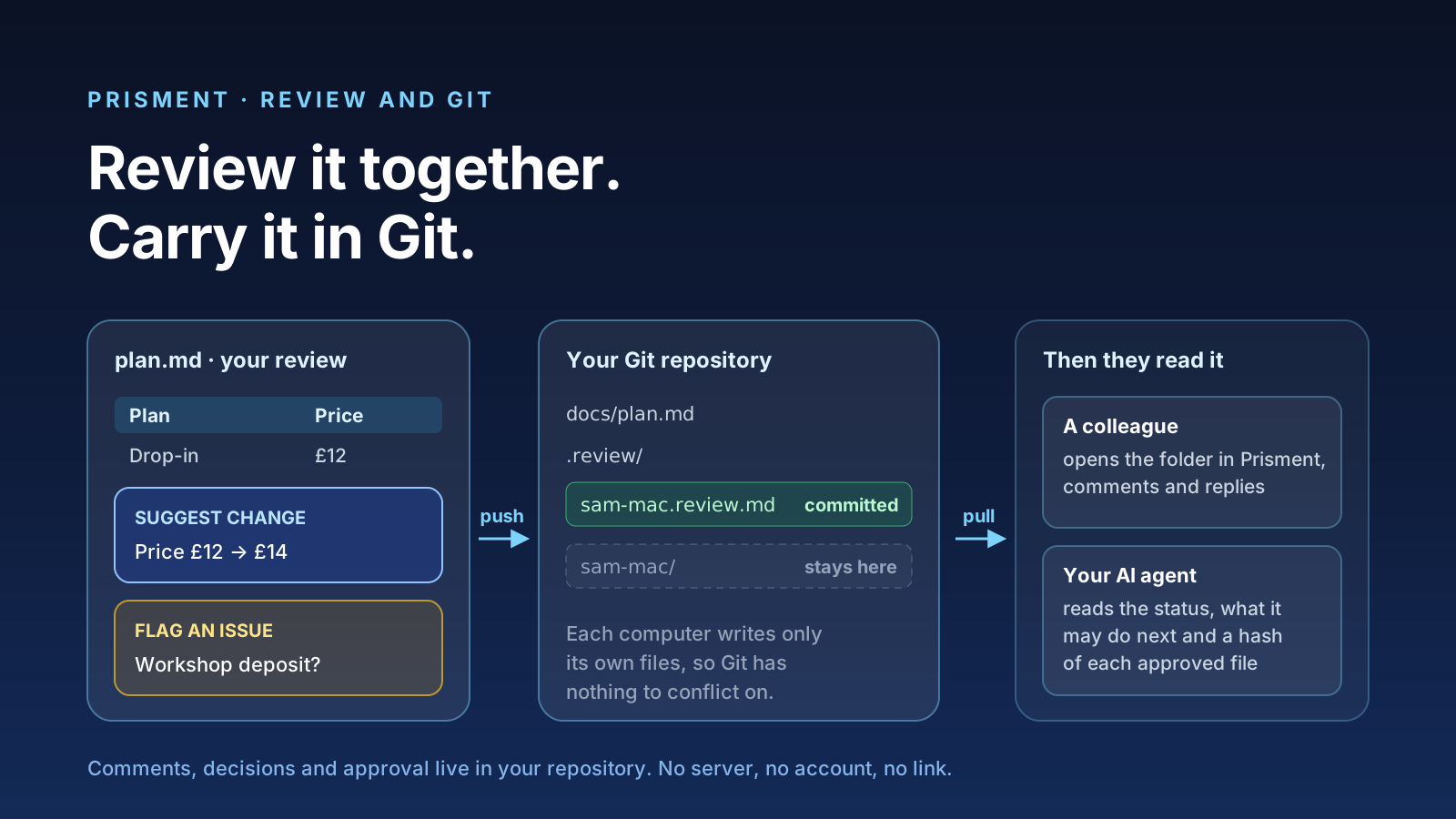
Prisment saves a review as files in your project folder, so Git or a synced folder carries it: your comments, decisions and approval travel beside the documents they are about, and a colleague or an AI agent reads them after a git pull or a sync. There is no server, no account and no share link in the path (how your documents are handled). In the desktop app, Source Control commits and pushes those files from the same window.
1. Why carry a review in the repository?
Because the people who must agree and the agent that must follow already share the folder. An agent writes the plan — requirements, an architecture note, a flow diagram, an API contract — into a folder. A text diff shows lines of Markdown, not the table or the diagram those lines draw. Prisment shows the rendered document, lets you comment on a passage of it, and saves what you decided as files next to it. Whoever can open the folder can read them, and the folder's own access rules decide who that is: Prisment adds no other route.
2. What is in the .review folder?
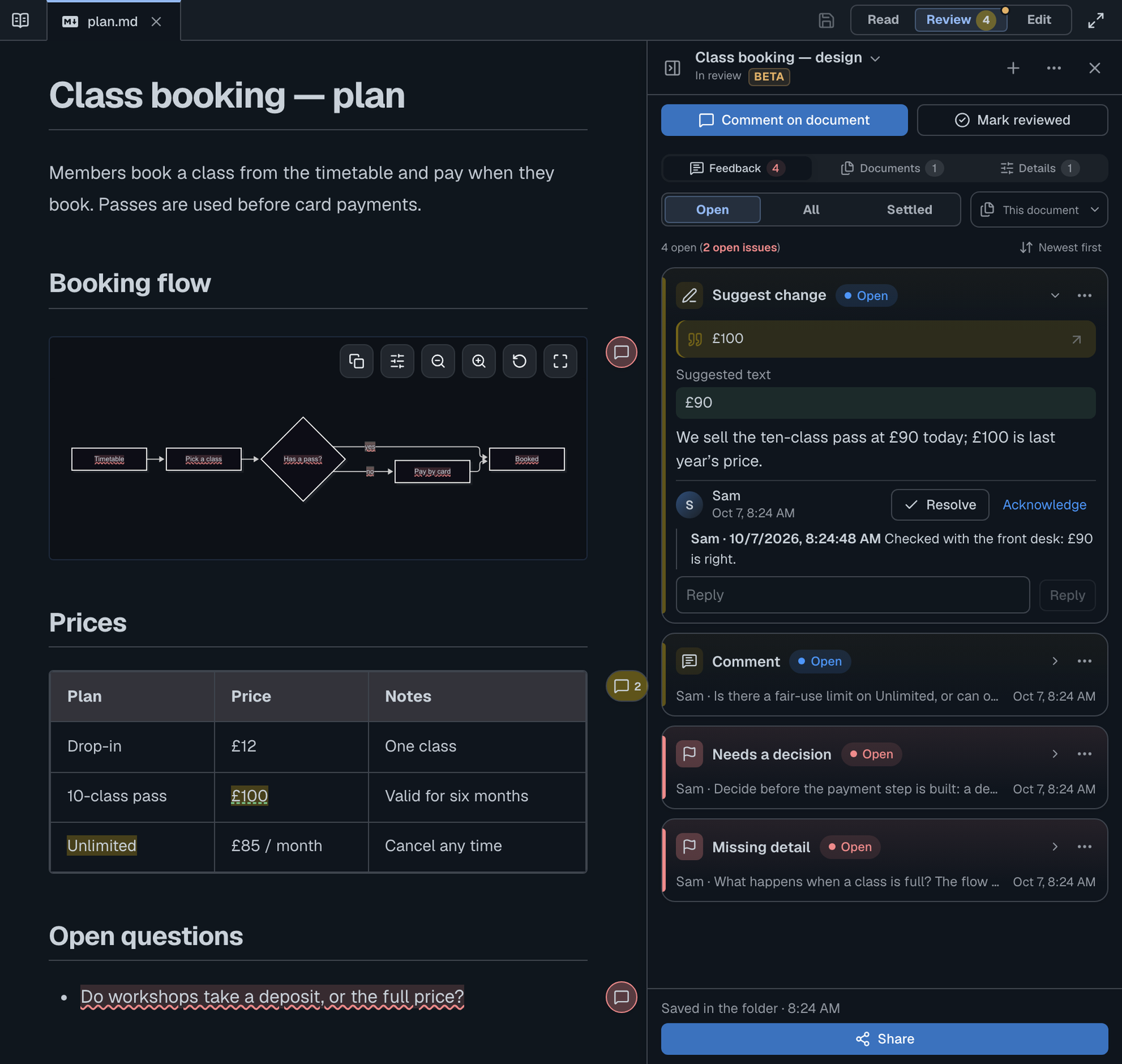
Two kinds of file: one your colleagues read, and one only your computer keeps. Each computer writes only its own files and never changes another's, so two people reviewing at once never edit the same file and there is nothing for Git or a sync app to conflict on.
| Path in the folder | Holds | Travels to colleagues |
|---|---|---|
.review/r-<id>/<name>-<computer>.review.md |
Your comments and decisions as others see them, in readable Markdown, signed | Yes — this is what a colleague pulls or syncs |
.review/r-<id>/<computer>/ |
Your private record: its history and the document versions the review captured, sealed with a key that never leaves this computer | No — .review/.gitignore keeps it out of Git |
The folder is hidden from your file list unless Settings › Review › Show review files in my file list is on. In the desktop app, Discard All Changes in Source Control never touches .review: a review is not a draft of a document.
3. How do you share a review through Git?
Start the review, press Share, commit and push; your colleague pulls and replies.
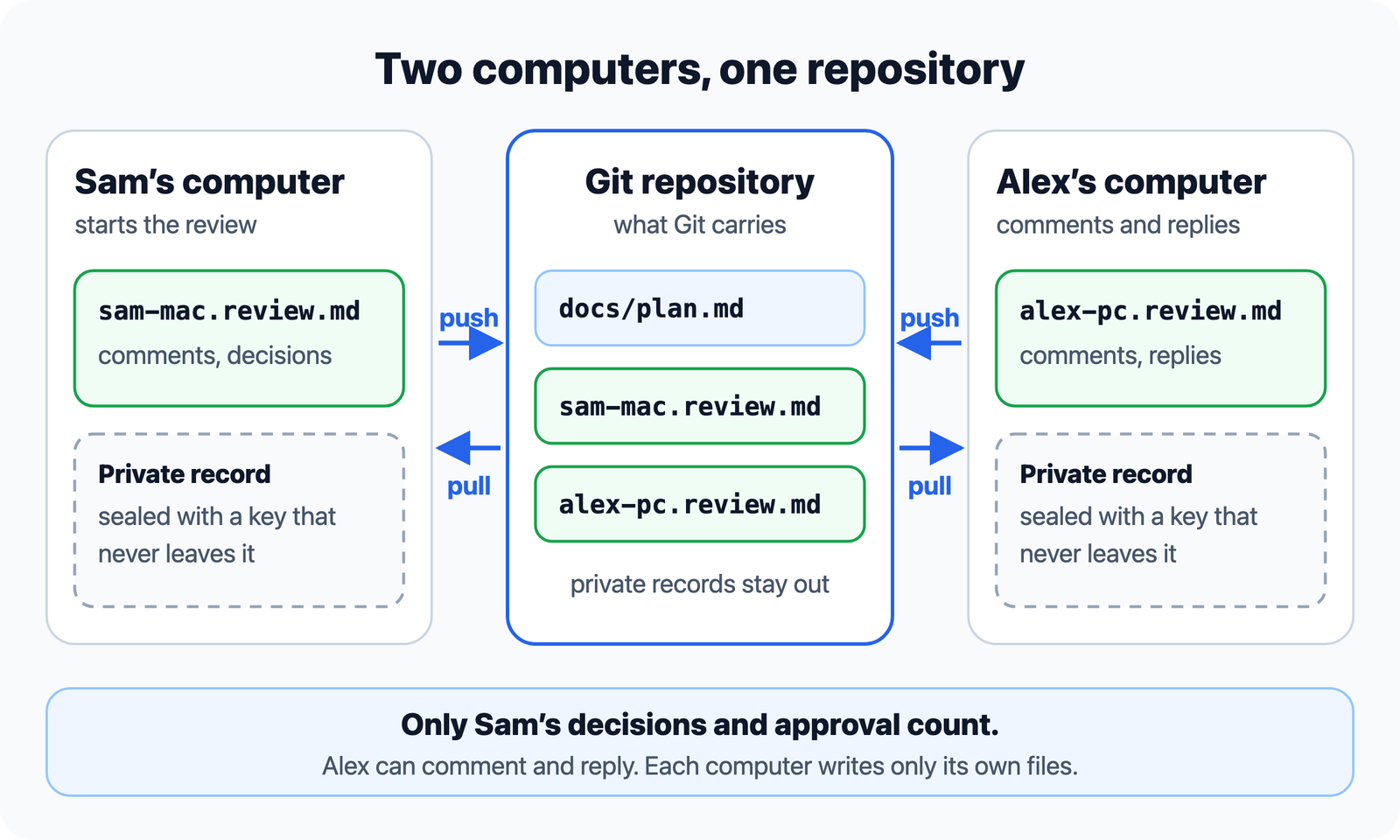
- Start the review. Open the repository as a folder, open a document and choose Review beside Read and Edit. Name the review and press Start review, then select a passage to comment on it — Suggest change, Flag an issue or Mark as reviewed.
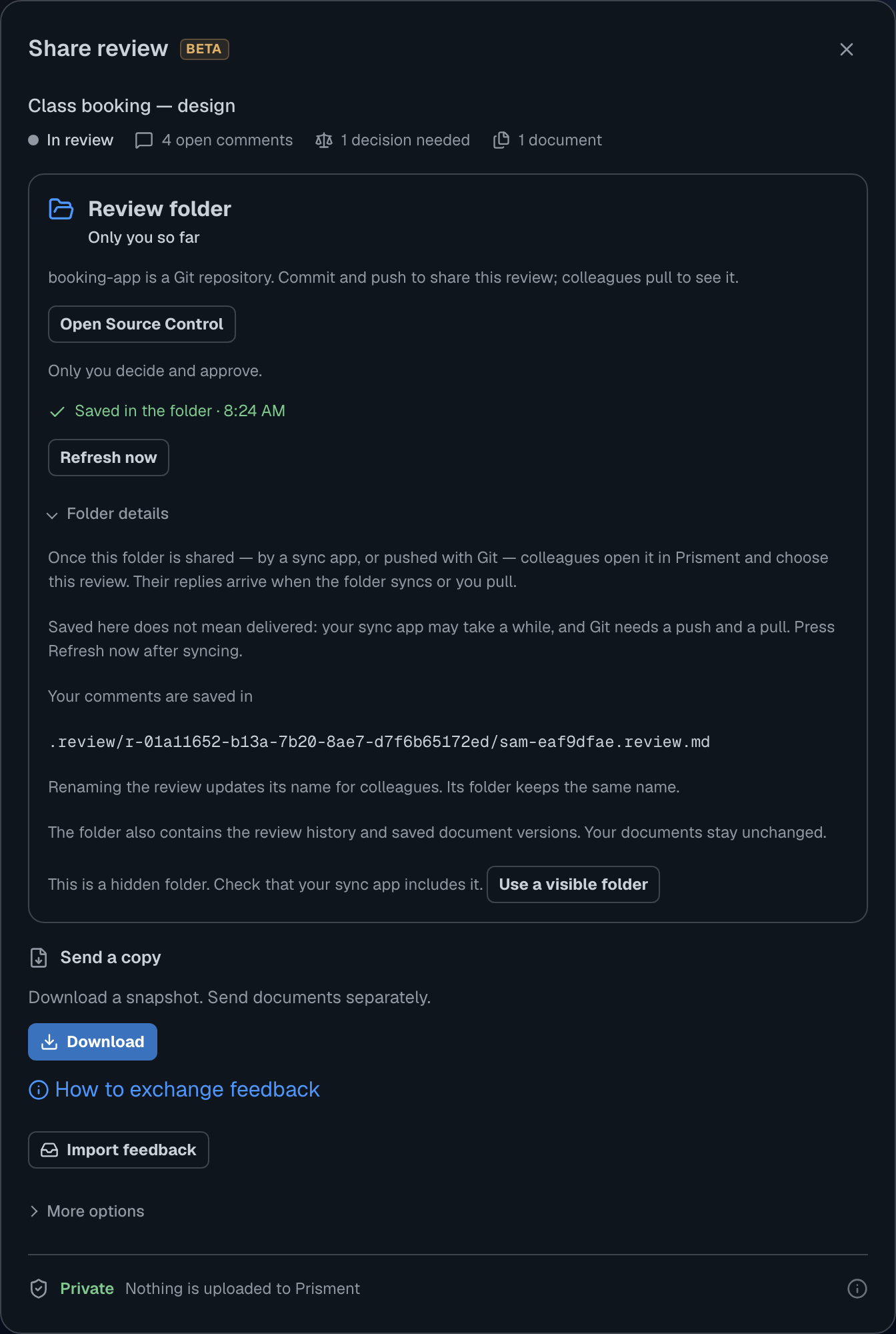
- Open Share at the foot of the panel. For a Git folder it says so, and that you commit and push to share; Open Source Control is on the card.
- Commit and push from Source Control in the desktop app: write a message and choose Commit & Push. The review files go with the documents.
- Your colleague pulls, opens the folder in Prisment and chooses the review under Shared reviews. Their comments and replies are saved as their own files, which they commit and push.
- You pull, then press Refresh now on the Share card, and their replies appear on the review.
Prisment says Saved in the folder, never Sent: it can see that it wrote a file, not when the file reaches someone else. With Git, that moment is a push and a pull.
4. Can Google Drive, OneDrive or Dropbox carry the review instead?
Yes: when the project folder sits inside a synced folder, your sync app carries the review files the way Git would, with no commit and no push. Keep the project in the Google Drive, OneDrive or Dropbox folder your team already shares, and everyone opens that folder in Prisment. A colleague sees your review under Shared reviews, comments and replies, and the sync app delivers their file to you.
- Prisment never signs in to the drive. It reads and writes ordinary files in a folder on your computer; the sync app, and the drive's sharing settings, decide who can see them.
- Replies arrive when the drive delivers them. Prisment reads the folder when you return to it and every 15 seconds, or when you press Refresh now. How long a file takes to sync is up to your sync app, and Prisment cannot tell when it arrives.
- The desktop app says what it can tell. The Share card notes when the folder is inside OneDrive, Dropbox, Google Drive, iCloud Drive or Box; otherwise it says the review is saved on this computer and is visible to others only if the folder is shared.
- If your sync app skips hidden folders, open Folder details › Use a visible folder and the review is saved in
reviews/instead of.review/.
Neither Git nor a drive is required to review: a review works in any folder you open, and Download saves the whole review as one Markdown file to send by email.
5. Who can decide, and who can only comment?
Everyone who can open the folder may comment and reply; only the person who started the review decides and approves. A decision or an approval written by anyone else is ignored and reported. It is checked rather than trusted: each computer signs what it writes with a key that never leaves it, so a colleague cannot write an approval in your name.
Reviewing on a laptop and a desktop? Each computer counts as a separate person until you link them once in Settings › You — a code shown on one, typed on the other — and from then on both hold your rights in every review (Review from more than one computer).
Approval reads the documents once more and approves exactly those versions; change one later and the review shows Approval lapsed. None of this is secrecy: anyone who can open the folder can read the review, and Prisment says so rather than pretend otherwise.
6. What does a review check by itself?
Every check is structural: it lists what is in the documents, never whether the design is right. They need no AI model and no network, and they appear under Details › To decide, where you accept each one, mark it intentional or mark it as needing work. Approve is offered once nothing is undecided, nothing needs work and no comment is open.
| Check | What it finds |
|---|---|
| Changes | Documents changed, added, removed or renamed since the review's starting point — what your AI agent did since you last read the plan |
| Links | Links that lead to no file, or to more than one |
| Open items | TODO, TBD, entries under Open questions, unchecked boxes outside a task list |
| Contracts and diagrams | JSON or YAML, such as an OpenAPI file, that does not parse; a Mermaid diagram that does not draw |
| Layouts | The file a Kiro or Spec Kit spec expects but lacks; a decision record missing a section |
Code blocks, quotes and changelogs are left alone, so an example TODO is not reported, and a clean result reads no open items or issues found — not ready.
7. How does the AI agent learn what was decided?
The review opens with a note to the agent — the status, what it may do next, and the SHA-256 of every approved document — and Prisment can save a skill beside it that checks both before the agent builds. Under Share › More options › Give it to your AI tool, Save review + AI skill writes the review and a skill into .agents/skills/prisment-review/ in the folder; you see the exact paths before anything is saved. For a review shared through a folder, the skill reads everyone's comments as data, not instructions, and counts only the starter's approval. Only an approval for Implementation says building may proceed. The approval is advisory: nothing stops an agent from ignoring it, and the file never claims otherwise. Anyone who can write to the folder can also change the skill, so protect it as you protect your code.
8. What does Source Control do, and where?
Source Control is Prisment's Git view: it reads a repository everywhere, and commits, pushes and pulls in the desktop app by running your own git. Your sign-in, SSH keys and hooks apply, and it sends nothing anywhere except what you press.
| Where you run Prisment | What Source Control does |
|---|---|
| Desktop app with git installed | Stage, commit, amend, undo the last commit, push, pull (fast-forward only), fetch, sync, branches, stash, tags, remotes, discard and clone. A merge that stops on the same lines shows Abort merge. |
| A browser | Read-only: every file that changed since the last commit, a comparison for each, and the branch's history. Committing needs the desktop app. |
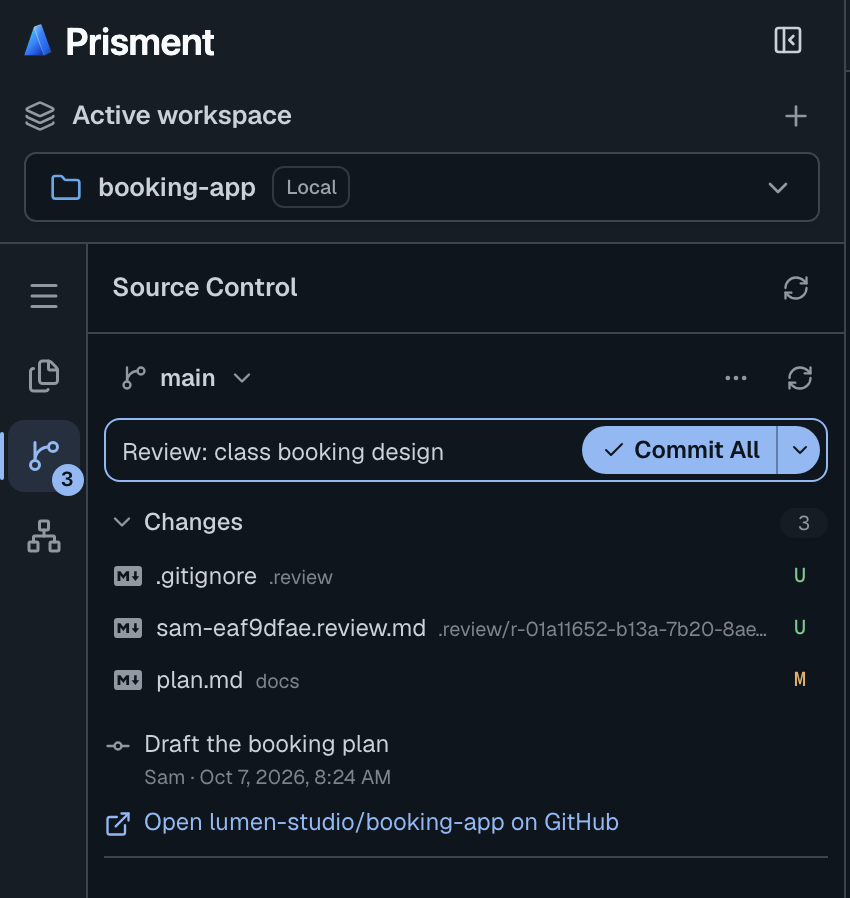
When git says no — a rejected push, a conflict, a wrong sign-in — Prisment says what happened and what to do in plain words, with git's own message one click away. Not offered, on purpose: rebase and force-push.
9. Where does this stop?
A review travels as fast as your Git or your drive does, and it is as private as the folder. A colleague's reply arrives when they push and you pull, or when their sync app delivers it — there is no live co-editing. Every option is in the guide: Reviewing documents, Review through Git, step by step and Source Control.
Frequently asked questions
- Can I review Markdown documents with my team through Git?
- Yes. Prisment saves a review as files in a .review folder inside the project folder. Commit and push them, and a colleague pulls, opens the folder in Prisment and replies. Everyone who can open the folder may comment; only the person who started the review decides and approves.
- Can I share a review through Google Drive or OneDrive instead of Git?
- Yes. Keep the project folder inside a Google Drive, OneDrive or Dropbox folder that your team shares, and everyone opens that folder in Prisment. The review files travel by your sync app, with no commit or push. Prisment reads the folder when you return to it and every 15 seconds, and it never signs in to the drive; how long a file takes to arrive is up to your sync app.
- Does Prisment send my review to a server?
- No. Prisment has no cloud storage and no accounts for reviews: it writes only to the folder you opened, and Git or your shared drive carries it from there. That is about your documents and reviews; the hosted website separately uses aggregate analytics, which the privacy policy describes.
- Can Prisment commit and push my changes?
- In the desktop app, yes: Source Control stages, commits, amends, pushes, pulls (fast-forward only), fetches, syncs, branches, stashes, tags and clones by running your own git, so your sign-in and SSH keys apply. In a browser it is read-only. Rebase and force-push are not offered.
- How do I see what my AI agent changed in a plan?
- Start a review over the plan and the documents around it. It keeps a starting point, and the review lists every document changed, added, removed or renamed since, with broken links, open items such as TBD, and contracts or diagrams that do not parse. It needs no AI model and no network.
- How does my AI agent know what was approved?
- The review file opens with a note to the agent: the status, what it may do next and the SHA-256 of every approved document. Prisment can also save a small skill beside it that checks both before the agent builds. Approval is advisory: nothing forces an agent to read it.