Read and Check an Open Knowledge Format (OKF) Bundle
Open an Open Knowledge Format (okf.md) bundle in place: see concept types, trust tiers and freshness, follow two-way links, and check the bundle in a review.
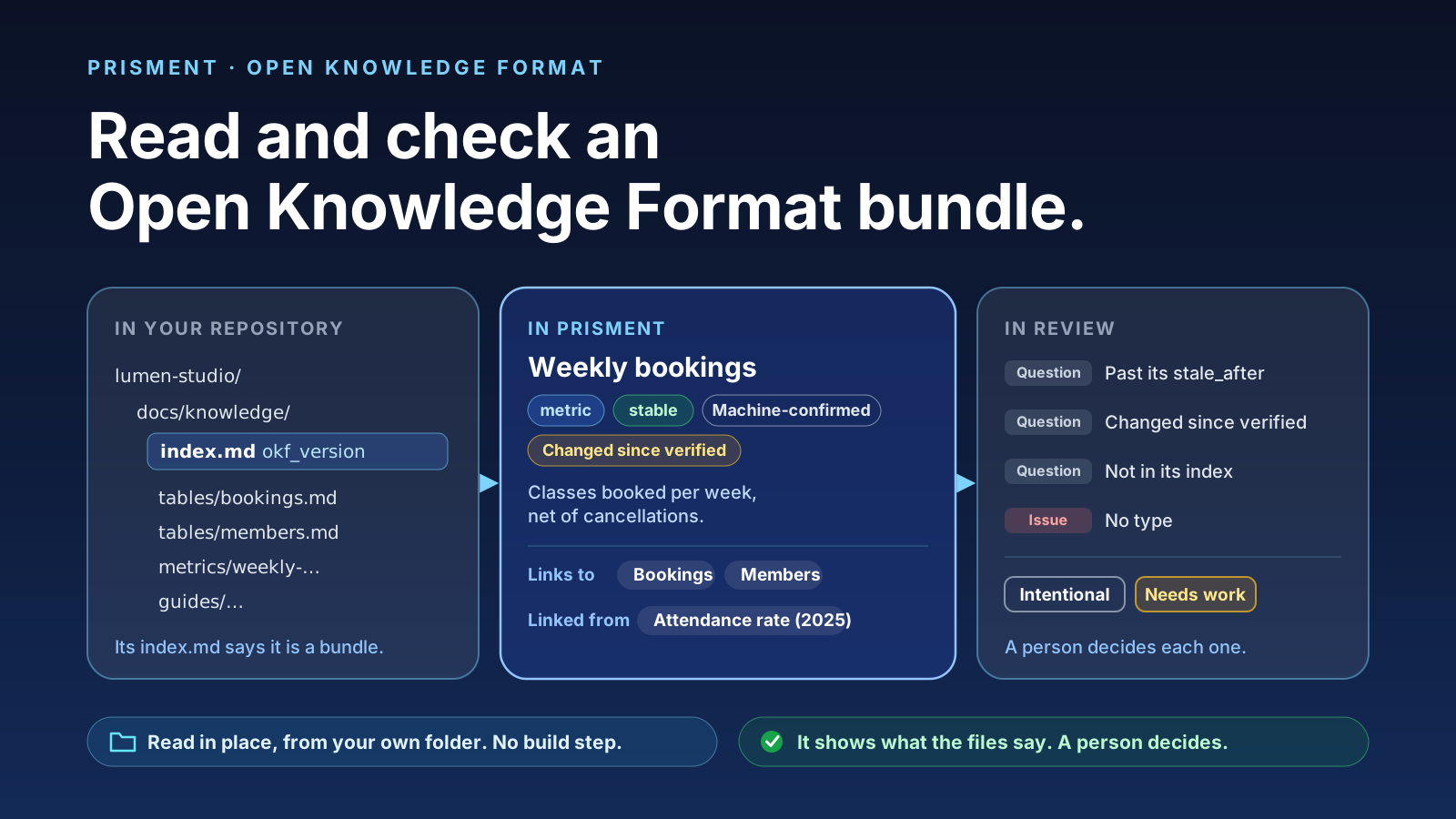
Prisment opens an Open Knowledge Format (okf.md) bundle where it already lives—a folder of Markdown in your repository—and turns each concept's YAML front matter into a readable summary of its type, status, trust tier and freshness, shows what it links to and what links back to it, and checks the whole bundle in a review. Nothing is converted, uploaded or built first. It is free, needs no account, and reads your documents in place (how they are handled).
1. What is an Open Knowledge Format (OKF) bundle?
A bundle is a folder of UTF-8 Markdown files—one concept per file, such as a database table, a business metric or a runbook—each opening with YAML front matter in which type is the only required key. Google Cloud introduced the format (announcement, specification) so data teams, engineers and AI agents share one versioned, human-readable knowledge base in Git.
Two file names are reserved: index.md (a directory of concepts) and log.md (a newest-first history under ## YYYY-MM-DD headings). A bundle declares itself with okf_version in the front matter of its top index.md (optional; see the FAQ), and each concept—such as metrics/weekly-bookings.md—carries its metadata at the top:
---
type: metric
title: Weekly bookings
description: Classes booked per week, net of cancellations, by the week the class runs.
status: stable
stale_after: 2027-04-30T00:00:00Z
sources:
  - resource: /tables/bookings.md
    title: Bookings table
  - resource: /references/booking-policy.md
    title: Booking policy
generated:
  by: process:nightly-sync
  at: 2026-10-28T02:00:00Z
verified:
  - by: metric-check/0.3
    at: 2026-10-21T02:00:00Z
---

# Weekly bookings

Count the [bookings](/tables/bookings.md) whose status is not cancelled, grouped by the week the class starts, for [members](/tables/members.md) on any plan.
Prisment is an independent reader of the format. It is not made, certified or endorsed by Google or the OKF project.
2. Why do ordinary Markdown editors fall short on an OKF bundle?
Because the fields that say how far to trust a concept sit unread inside raw YAML, reverse links between concepts are invisible, and /-rooted bundle links break whenever a bundle is a subfolder. Agents read the YAML through scripts or MCP servers; a person in a text editor or on GitHub hits three blind spots:
- Silent trust and freshness decay: A
stale_afterdate passes without a sign, and a concept rewritten by an automated sync (generated.at) days after someone last checked it (verified[].at) looks identical to one checked today. - Broken
/links in subfolders: A link written/tables/bookings.mdmeans the bundle's top. When the bundle sits indocs/knowledge/, GitHub and standard previews read/from the repository's top instead. - One-way reading: A table's file shows what it links to, never which metrics or guides link back to it.
3. What does Prisment show on a concept?
A summary line in place of the word Frontmatter: the concept's type and status, its derived trust tier, whether it changed since it was verified, whether it is still fresh, and its one-line description. The three trust tiers (Human-reviewed, Machine-confirmed, Unverified) are the specification's, read from verified. Changed since verified (generated.at later than the latest verified.at) is Prisment's own signal, shown beside the tier and never as one.
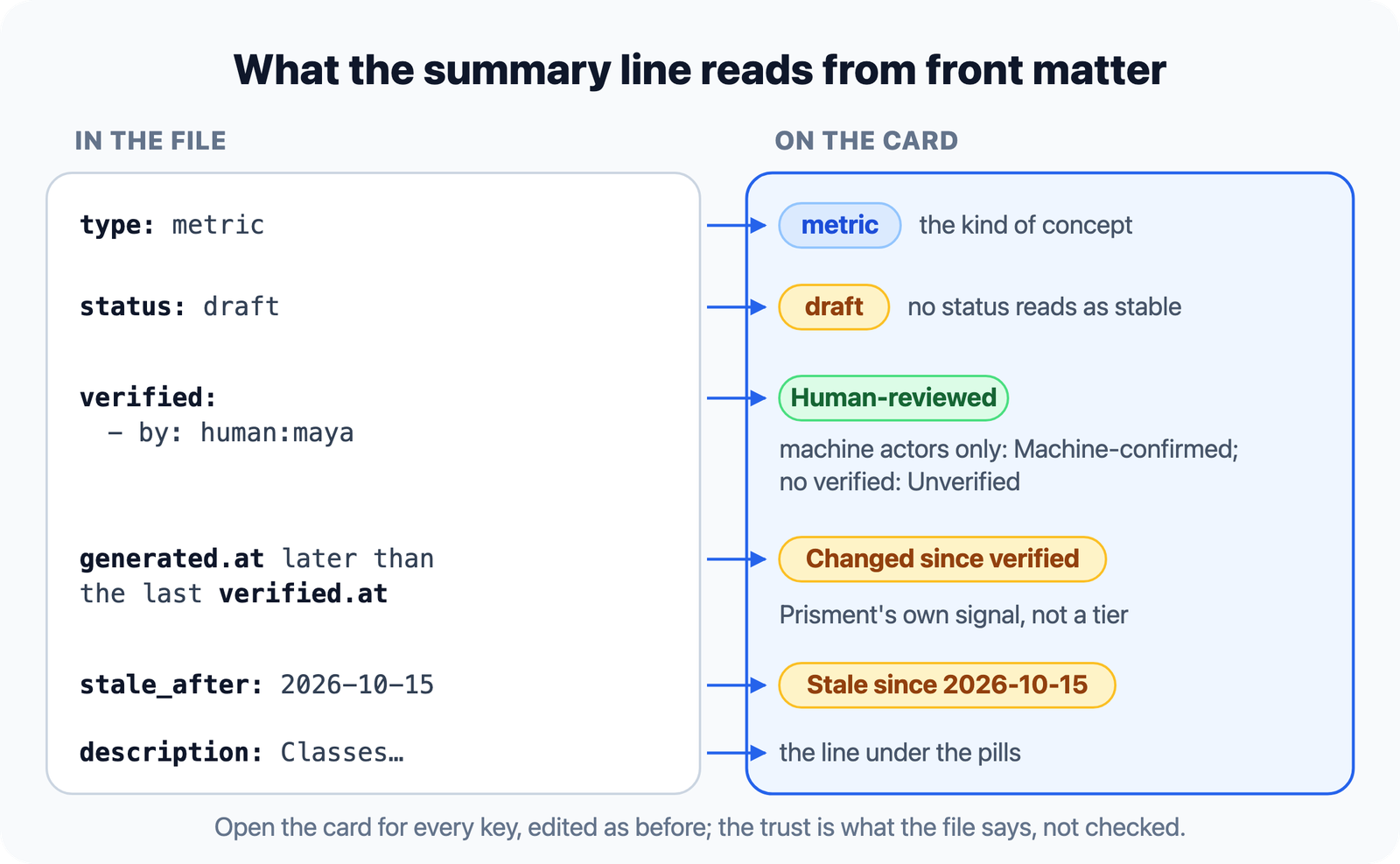
Open the card for every key, edited as before, with unknown keys and YAML comments kept.
4. How do you follow two-way links across a bundle?
Above a concept in Read and Review, a bar lists what it Links to—its sources and the concepts its body names—and what it is Linked from across the bundle, each by its concept title so a click opens it. The specification gives links no type, so the bar says links, not depends on. At its end, Verify adds your own human: entry to the concept's trust list, signed with an id you type once; Withdraw undoes it.
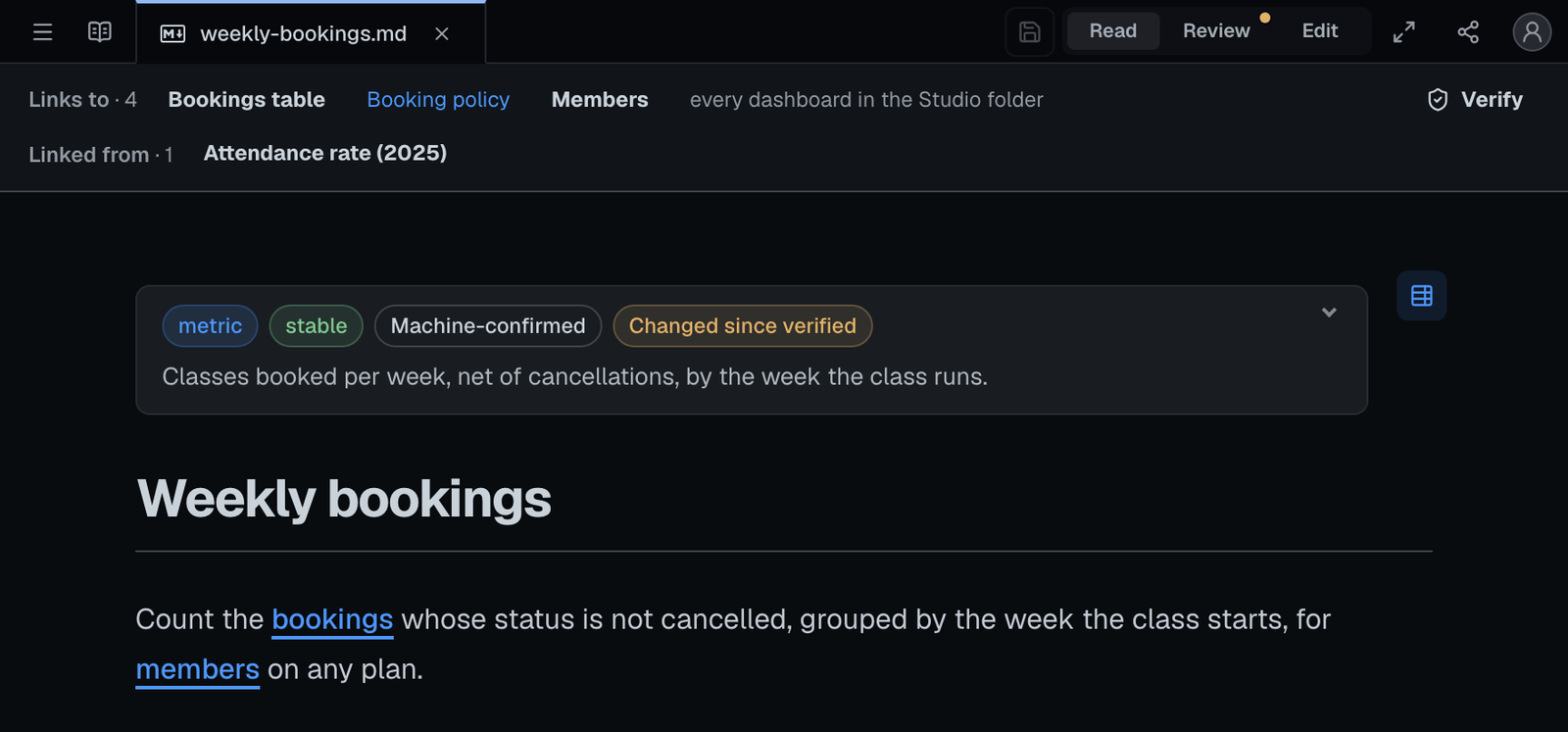
Inside a bundle, a / link starts at the bundle's top, so a bundle in docs/knowledge/ follows its own links, never a same-named file at the repository's top. In a local folder, opening a concept also reads the bundle's unopened subfolders so Linked from counts every concept.
5. How do you keep a bundle's index.md complete?
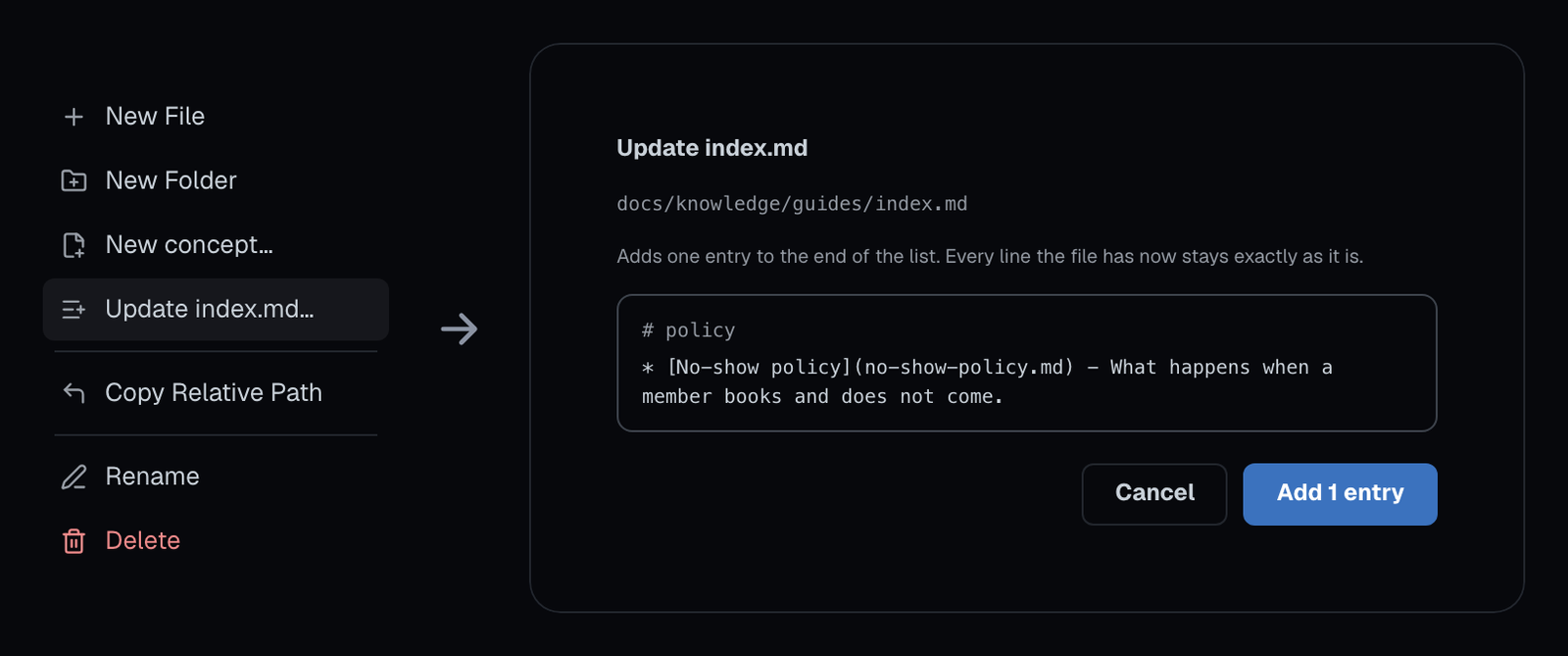
Added a concept and forgot to list it? Right-click its folder and choose Update index.md…: Prisment shows every line it would add and writes nothing until you press Add.
- Right-click the folder and choose Update index.md… (Create index.md… if it has none).
- Read the preview. Each concept sits under a heading for its
type, with its title and description; subfolders go under Subdirectories. - Press Add. Every line already there stays; Prisment only adds.
6. How do you check a whole bundle before it ships?
Start a review, add the bundle's folders, and decide each finding as Intentional or Needs work before you approve—with no command-line linter to install.
- Open the folder that holds the bundle with Open Local Folder, in Chrome, Edge or the desktop app.
- Start a review. Open any concept, choose Review beside Read and Edit, name it and press Start review.
- Add the whole bundle. From the panel's ⋯, open the review window; in Documents, press Choose documents and tick the bundle's folders.
- Decide each finding in To decide: Intentional or Needs work, with a reason if you like.
- Approve once everything is decided. The approval is saved in
.review/and names the exact versions you read.
| What Review checks in a bundle | Shown as |
|---|---|
A concept with no front matter, YAML that does not parse, or no type |
Issue |
An index.md below the top with front matter; a log.md day not written YYYY-MM-DD |
Issue |
A concept past its stale_after, or changed (generated.at) after it was last verified |
Question |
An active concept still linking to a deprecated one, or missing from its folder's index.md |
Question |
A field that cannot be read (a stale_after that is no date), a verification dated ahead, or a version other than 0.1 or 0.2 |
Question |
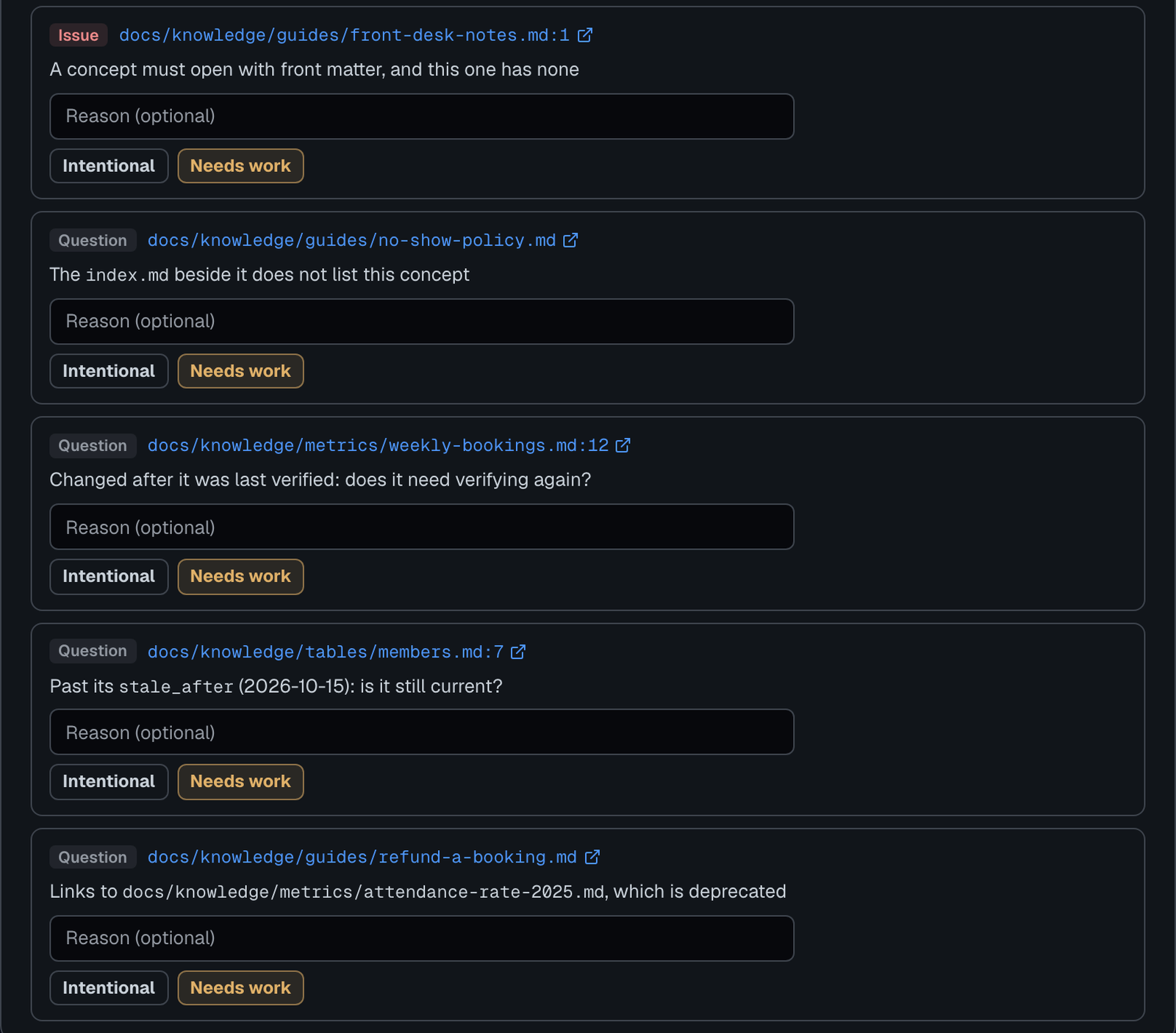
A folder that does not read as a bundle gets no OKF finding, and a missing index.md is never one: the specification tolerates it. The questions are signals for a person to weigh, never hard errors.
7. Can people who do not use Git read the bundle?
Yes: export it as an Interlinked Wiki—a folder of linked HTML pages with a searchable sidebar—where each concept keeps its summary line and a bundle's / links work from wherever the pages are unzipped. Select the bundle in the file tree and choose Interlinked Wiki. A page says Fresh until or Stale since on the day it is opened, not the day it was exported. Each page fetches its stylesheet and runtime the first time it opens, as every export does.
8. How can you try a bundle right now—and where does it stop?
Choose Create New › Demo › Knowledge bundle (OKF) to make an eight-file sample bundle in your browser or in a new local folder; made in a folder, it arrives with a review of the whole bundle waiting, its three questions to decide. Prisment reads and checks a bundle; it does not extract schemas from a database, run a concept's SQL queries or say whether its content is right; the local assistant reads a concept as an ordinary document, never as an instruction. Details are in the guide: Open Knowledge Format bundles and reviewing documents. Open the workspace and open your bundle's folder, or try the OKF demo. To compare Prisment with six other viewers, see Best OKF Viewers, Compared.
Frequently asked questions
What is the Open Knowledge Format (OKF)?
The Open Knowledge Format (OKF) is an open specification, introduced by Google Cloud and published at okf.md, for storing domain knowledge—such as database tables, business metrics, and runbooks—as Markdown files in Git so people and AI agents read the same source of truth. Each concept file opens with YAML front matter in which type is the only required key.
How does Prisment know a folder is an OKF bundle?
By the okf_version key in the front matter of the folder's index.md. The specification makes that key optional and Google's own reference bundles omit it, so a plain index.md with three or more concepts below it that carry a type and a key only OKF defines, such as sources or generated, counts too. Never the folder's name. Review audits only a bundle that declares itself.
What do Unverified, Machine-confirmed and Human-reviewed mean?
They are the specification's three trust tiers, read from a concept's verified list: no entry is Unverified, entries from tools or processes only are Machine-confirmed, and an entry from a human: actor is Human-reviewed. An entry counts only with an actor in the format's own forms, human:<id>, process:<id> or <producer>/<version>. When generated.at is later than the latest verified.at, Prisment also shows its own signal, Changed since verified, beside the tier. In Read, Verify at the right end of the concept bar adds your own human: entry to the list, with a reviewer id you type once and Prisment keeps in your browser only, and Withdraw takes it out again. Prisment shows what the file says and does not check it.
Why do slash links like /tables/bookings.md break in other Markdown viewers?
OKF recommends bundle-relative links starting with a slash (/tables/bookings.md), which mean the top of the bundle rather than the top of the Git repository. When a bundle lives inside a subfolder such as docs/knowledge/, ordinary previews look at the repository root and miss the file; Prisment resolves the slash from the bundle's top: the nearest folder above whose index.md declares okf_version, or that reads as a bundle without it.
Can Prisment create or update a bundle's index.md?
Yes. Right-click a folder inside a bundle and choose Create index.md where it has none, or Update index.md where its index leaves a concept or a subfolder out. The dialog shows every line before it writes: each concept under a heading for its type, with its title, link and description, and subfolders under Subdirectories, the way Google's own generated indexes group them. A new index at the bundle's top declares okf_version. It only ever adds: every line already there stays as it is, and a concept already linked is not listed twice.
Does Prisment change my concept files?
Reading a concept, its summary line and its links write nothing. Editing a value in the front matter card changes only that line and keeps every other key and comment. A review is saved in a hidden .review folder inside the folder you opened.
Is Prisment made or endorsed by Google or the OKF project?
No. Prisment is an independent app that reads the format as the specification describes it. It is not made, certified or endorsed by Google or by the Open Knowledge Format project.
Does it need an account or an install?
No account, and it is free. Opening a folder works in Chrome or Edge, or in the desktop app for macOS, Windows and Linux, and Create New › Demo › Knowledge bundle (OKF) lets you try a sample bundle in any browser. Your documents stay in your folder; the hosted website separately uses aggregate analytics, which the privacy policy describes.