Introducing the Prisment Local AI Assistant: Your Folder, Your Model, Your Machine
Meet Prisment's local AI assistant: ask your folder questions, make changes you can undo, and keep every document on your computer.
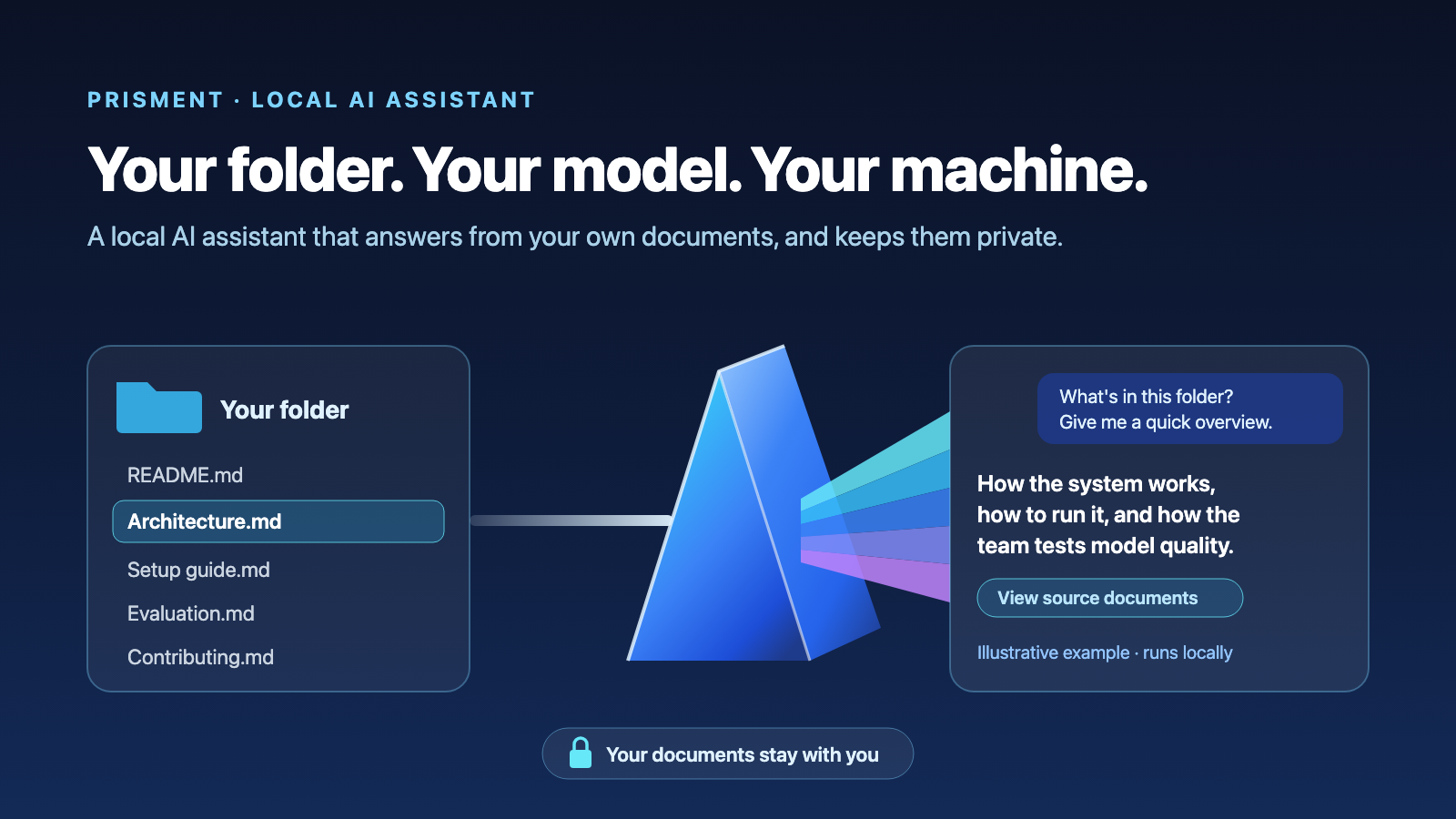
Prisment's desktop assistant helps you ask questions about your documents and make changes you can review and undo. It uses an AI model running on your own computer. Your documents stay on your machine. Since 27 September it is out of beta, with Qwen2.5-Coder 14B as the model we recommend — and important answers still need checking.
Think of it as a helper that reads the folder you choose. Ask “What's in this folder?”, “Summarize these documents”, or “Explain how this project works.” Prisment finds relevant text and gives it to your local model.
Our goal is to make everyday computers as useful as possible, without requiring a cloud AI subscription. Updated 27 September 2026: the app now checks every answer against the text it supplied — see section 5 — and this article includes what our tests found and what still needs work — including what to expect from a small and a larger model, in section 6. Technical explanations and detailed results are optional—expand them when you want more.
1. What you can do with it
Ask your folder questions, have documents changed by asking, and see how your files connect, all with a model on your own machine. You ask in plain language; there are no commands and no @file syntax.
| You want to | What happens |
|---|---|
| Ask about your documents | Prisment retrieves relevant passages, and the answer ends with the lines it came from |
| Summarize or review a document | Each summary point names its section; a review starts with problems the app found itself — in prose and in code such as Java |
| Ask what is left on a to-do list | The app counts the task list itself and names the open items with their lines |
| Ask a follow-up | The conversation travels with the question, and the files the last answer cited, and any web page read in the chat, stay in view |
| Change a document | It edits, writes, adds sections, renames with links repaired, or deletes. Every change has a before-and-after view and an Undo button |
| See how your folder connects | The Knowledge panel draws which document links to which, and finds what nothing links to and links that go nowhere |
| Read a web page you mention | Every new page asks you first: once, for this chat, or for this workspace. Without the page, the question is not answered |
Start with an overview of your folder: what the project does, how to run it, and where to find its evaluation notes. Then ask for a summary or explanation of a document you want to understand. The cover illustrates a folder-summary conversation; it is an example, not a captured model response.
The line above an answer lists the files supplied to the model. Open Context to inspect them. When you ask for a document change, the assistant shows what changed and lets you undo it. A request with several steps becomes a to-do list you can follow.
What it needs: the Prisment desktop app for macOS, Windows or Linux, and Ollama or LM Studio with a chat model. We recommend qwen2.5-coder:14b, about 9 GB; llama3.2:3b, about 2 GB, runs on an ordinary laptop with the limits in section 6. Small models can still fail or refuse a valid edit. Prisment never downloads a model for you.
2. Our goals: small models made useful, private and under your control
We built the assistant around four goals. It should make a small, free model useful, keep your documents private by construction, keep you in control of every change, and be honest about where each answer came from. These are design goals; the measurements below show where behavior still falls short.
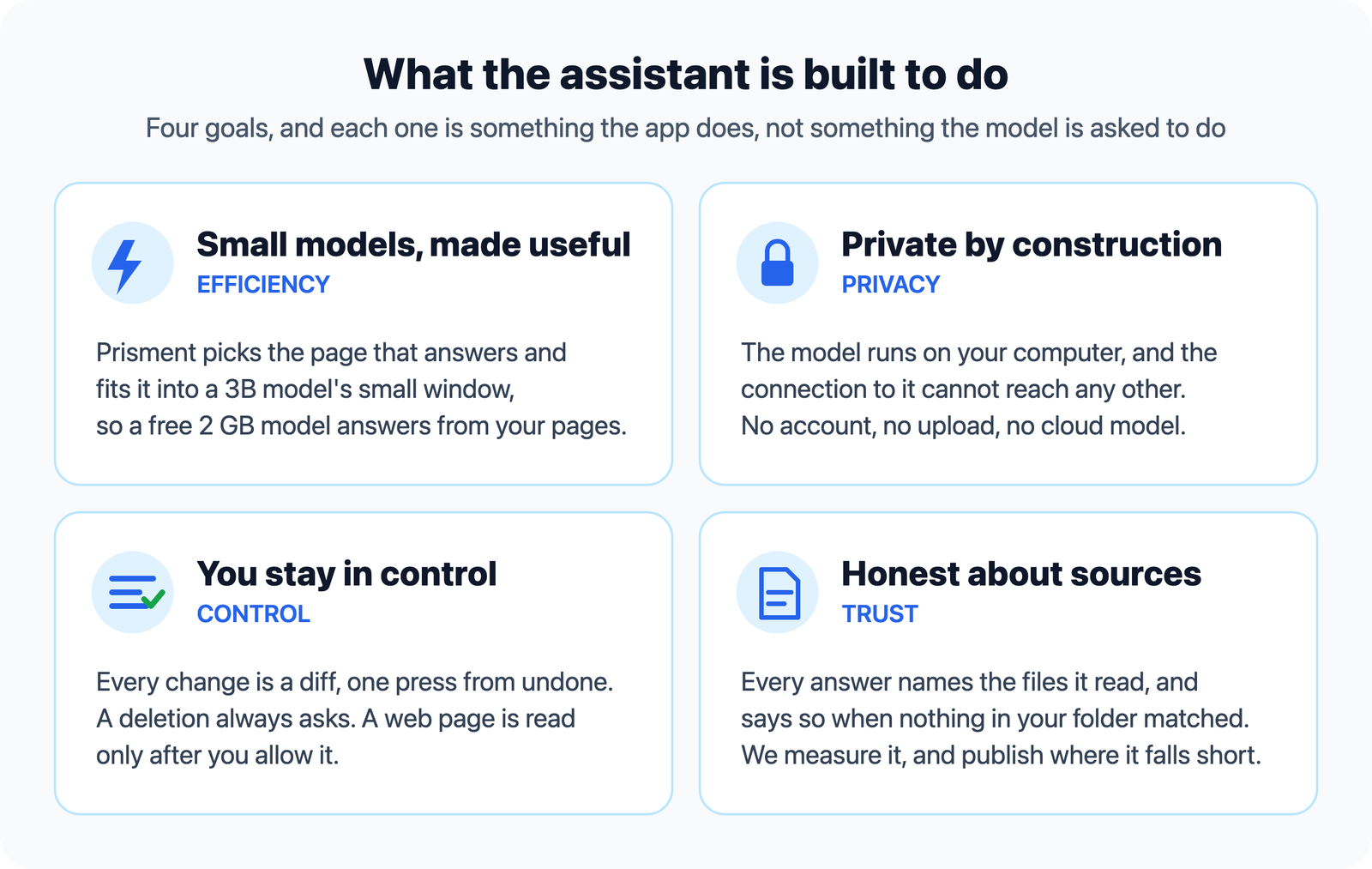
- Efficiency. Help a small model focus on the passages that matter, use less memory and avoid unnecessary work. We are still measuring which changes improve both speed and answer quality.
- Privacy. The model and your conversations stay on your computer. No account or document upload is needed. Chats are stored separately from your documents, so sharing your folder does not include its chat history.
- Control.
- Every change has a before-and-after view and an Undo button.
- A deletion always asks, and so does a reply that changes several files.
- The panel's Ask / Edit switch decides whether the assistant may write at all.
- A web page is read only after you allow it: once, for this chat or for this workspace, that page or its whole site. A question is not answered without the page it links.
- You choose the model and how much text it can read at once. The panel shows its memory use and lets you free that memory.
- Honesty. The panel lists supplied context and records lookup outcomes. That shows what the model could use; it does not prove that every statement follows from it. We publish what we measured, including the failures.
3. How it finds an answer
Prisment finds relevant parts of your documents, gives them to your local model, and shows which sources were supplied. The model can ask the app to look for more information before replying.
- You choose a folder and ask a question.
- Prisment searches the files and their connections.
- It fits relevant text into the amount your model can read.
- The model writes an answer; you can inspect its sources in Context.
A source in that list means the model received it. It does not guarantee that every claim in the answer is correct.
Technical details: search, document links and memory budgets
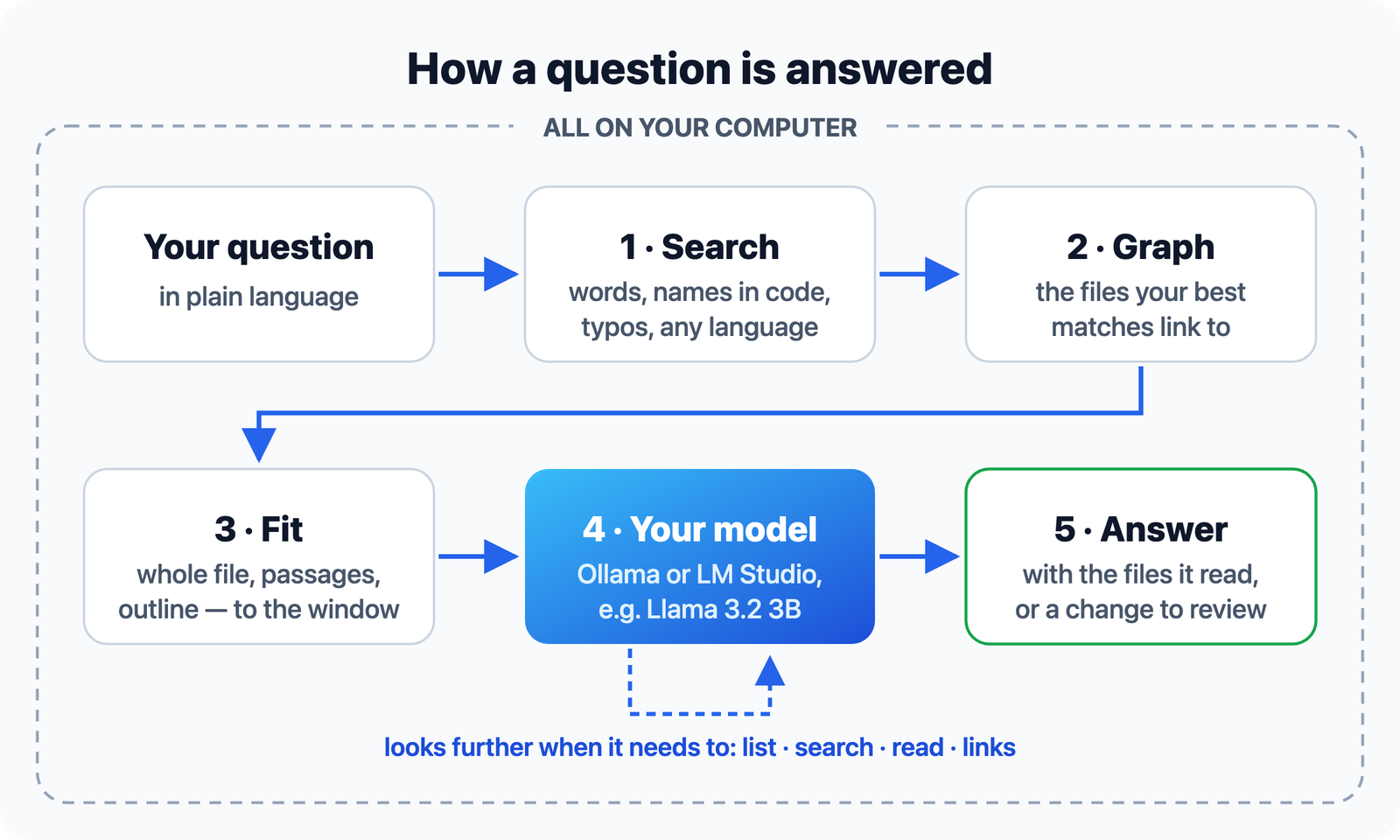
- Search. Headings, paths, names declared in code and body text are all indexed.
useWorkspaceSyncis found by its parts. Back-off also matches backoff, and retries matches retry. A misspelled or shortened word still finds its match, and every script is searchable, from Devanagari to Han. The index lives in a cache on your computer, not in your folder, and is brought up to date whenever it is used. - Graph. Links, wikilinks, file names mentioned in prose and code imports form a graph. The files your best matches name become candidates too, ranked just below the file that names them.
- Fit. The best files go in whole if they fit, the next as their matching passages, then as an outline, then as a line each. A file you name goes in first, and words you put in quotes are matched as a phrase. Credentials, such as a
.envfile or a private key, are withheld before anything is sent. - Your model. It answers from what it was given, and when that is not enough it can list a folder, search, read a file or follow links: up to four rounds, each lookup on your computer.
- Answer. The line above the answer says what the model read, and Context lists every file and how much of each went to it.
In the 25 September configuration, 576 tokens remained for documents at a 4,096-token window and 2,654 at 8,192 after instructions and answer reserve. Those budgets depend on the conversation and settings. Answer times depend on the model, the machine and the question; we do not promise one.
4. Why connections between files help
A useful answer may be in a document linked from the one you searched for. Prisment can follow that connection. For example, a troubleshooting note may point to the file that explains how a feature works, even when the two use different words.
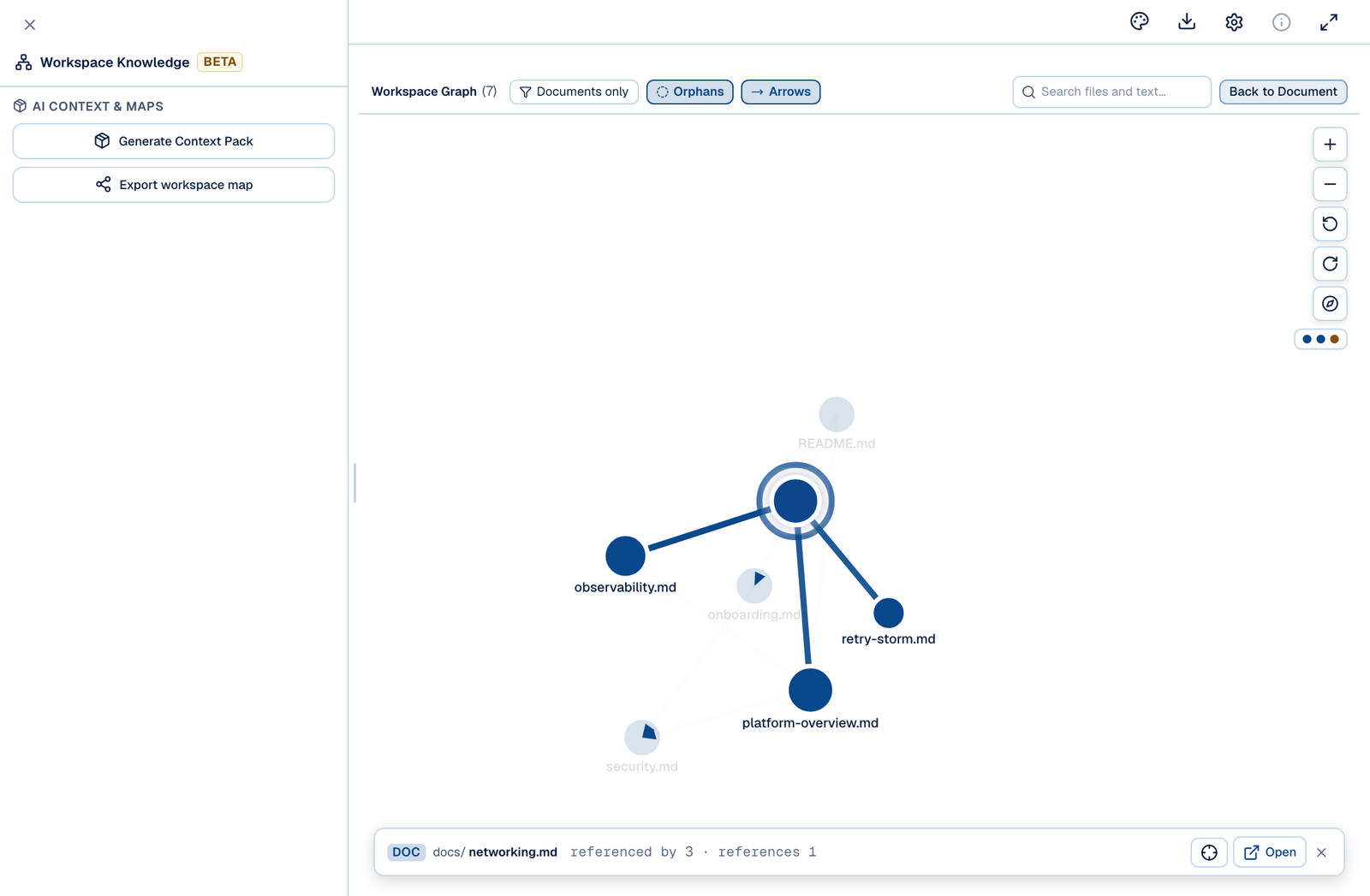
The Knowledge panel shows these connections as a map. It can help you explore related documents and spot broken links.
Technical notes: what the document graph adds
A post-mortem titled "we could not explain the scheduler" quotes the question "how does the scheduler decide what runs next" word for word. The file that answers it, src/queue/dispatch.ts, contains none of those words; it declares JobPriorityQueue and claimEligibleJob. Keyword search ranks the post-mortem first and never ranks the code at all. The post-mortem names dispatch.ts, so the graph brings that file in second, and the answer arrives.
The same graph is what the Knowledge panel draws: every document, and what links to what.
On our own labelled questions — each with one file that answers it — following links brings in the answering file where keyword search misses it, and across those questions it never does worse than keyword search alone.
It did not always. Until 25 September, fusion counted a file twice when it was both a faint keyword match and named by the answer. broker.ts matched "what does DeadLetterQueue do" on the word queue, and was imported by the file that declares it; scored twice, it outranked the answer. A file now counts once, at the better of its two places. A test fails the build if the graph ever does worse than keyword search again.
These are our own questions; they do not establish performance on every folder.
5. What the app checks in every answer
A small model is good at wording and weak at bookkeeping, so the app does the bookkeeping: it checks each answer against the exact text it gave the model, and says what it found under the answer. The model is left the part only it can do — choosing and wording.
| The app checks | What you see |
|---|---|
| Which lines each sentence came from | Sources: docs/networking.md (lines 17–18) under the answer, even when the model forgot to cite |
| A number or name no supplied line contains | Not found in the supplied sources: 45 — and such a sentence is never given a source |
| A figure given to the wrong subject | The supplied sources do not give 2018 for Maple — when the file gives it to Birch |
| Whether a summary covered what you asked | Each point ends with its section, (§ Saving); a section you asked about and nobody covered is named |
| Whether a review points at real problems | Repeated or empty sections, unfinished TODOs, broken tables — and in code (Java, Kotlin, Python, Go, Rust and more), ignored exceptions and leftover debug output — found by the app with their lines, before the model's own suggestions |
| A value in code the answer names but never gives | Set in the code: MAX_RETRIES = 5 (RetryPolicy.java, line 7) — and a quoted line with a figure changed is shown as the file really has it |
| A to-do list | Counted in TODO.md: 4 of 7 tasks done; still open: … — and an item the answer puts in the wrong state is named |
| An answer that says the folder does not have it | Kept, in the app's words — The supplied sources do not answer this question — rather than replaced by a request to try again |
The model's own review suggestions are labelled as such: the app checks that their quotes are really in the file, not that their reasoning is right. And the app's notes are kept out of what the model is shown next — a small model that sees "5 of 5 tasks done" will otherwise copy the line with its own numbers.
Test notes: how the answer checks were tried, 26–27 September
Several seeded trials per case, through the same code the panel runs, with both models. Development cases were used to build the checks; one case was held out — a design-decision record written and fingerprinted before its first run. With both models the checks did what they are for: summaries named their sections, reviews started from the problems the app found, answers named their lines, and a figure no supplied line contained was flagged. The small model answered much sooner.
The held-out case's first run failed: the record's own Context heading ended the app's reading of it after one line. We fixed that general defect without changing the case's checks, so the case has now informed one fix and the next claim needs a new one. An older 4B model improved on the source questions — and on the way the checks briefly gave its wrong "Maple signed in 2018" a source; that is why a figure moved onto another subject is now reported and never sourced.
These are small, fixed cases on one Mac, and we wrote and graded them. They show the checks working, not how every folder will go.
6. What our tests mean for you
The assistant can find useful information, but our tests also found wrong claims, missing details and unreliable sources. The app now catches much of that, not all of it, and we cannot yet call it excellent or best in its class. Those limits come from the model, our software and how they work together; they are not all explained by limited memory.
| What we learned | What you should do |
|---|---|
| Finding relevant text helps, but does not guarantee a correct answer | Open the lines named under the answer for important facts |
| A line under the answer shows where a sentence came from, not that it is true | Read that line when it matters |
| Summaries now name their sections and gaps, but wording can still blur a distinction | Check a point against the section it names |
| The model's own review suggestions can argue wrongly even when their quote is real | Treat them as opinions; the checked findings above them are facts |
| A change can succeed in one trial and fail in another | Review the change and use Undo if needed |
We ran tests on our own example folders and on public research datasets. The public answer pilot missed much of the expected information. Its detailed scores below are a starting point for improvement, not a product accuracy rating.
What to expect from each model
A small model is quick and usually finds the fact, but may guess when your folder has no answer; a larger one is steadier on harder questions and noticeably slower. The app checks both the same way. This is what we saw asking both models the same kinds of question, many times over, on test folders of design notes, runbooks, source code and to-do lists. It is a description, not a score: on our own folders we are the judge, so we do not grade ourselves.
| When you ask… | Llama 3.2 3B — small, runs on an ordinary laptop | Qwen2.5-Coder 14B — larger, needs more memory |
|---|---|---|
| For a fact in one document | Usually right, with the lines it came from | Usually right, with the lines it came from |
| About something spread over several documents | Often joins them correctly; can mix up which figure belongs where | Joins them more reliably, but can still conclude that two different values match |
| Something your folder does not say | May guess, or give an odd reason — the app flags a figure it cannot find, and says so in its own words when the model declines | Usually says plainly that the folder does not say |
| For a summary | Follows the shape you asked for; can leave a section out — the app names what was not covered | Keeps the sections you asked for |
| In another language than the document's | Can miss the document, and says it cannot find an answer | The same |
| For a review | Starts from problems the app found; its own suggestions can be generic | Starts from the same problems; its own suggestions are more specific, and still opinions |
| What is left on a to-do list | Trust the app's count under the answer — the model's own sentence can disagree with it | Usually lists the open items right, but can miscount the total beside the app's count |
| About code | May name a constant without its value — the app adds the value | Reads code well |
| How long it takes | Seconds for most questions | Noticeably slower; reviews can take a while |
How we learned this. Two question sets were written for the purpose and fingerprinted before their first run, and we read every answer ourselves rather than trusting keyword checks, which both pass wrong answers and fail right ones. We also put the same questions to two other open-source local document apps at their defaults, on the same machine and models — not to rank anyone, but to see what a reader gets elsewhere and where our own app falls short. The clearest lesson was speed: we are slower, and reviews on the larger model most of all.
What reading the answers taught us — and changed. A correct answer was being thrown away: the two lines it came from sat either side of a blank line, the app could not match it to them, and after one retry it replaced a right answer with "could not produce an answer". The small model kept asking to re-read files it had already been given in full, so one answer could take several trips to the model; the app now answers those requests itself. A few replies repeated one paragraph over and over until the model ran out of room — a long wait for nothing, and the slowest answers we saw; the app now stops a reply that has started repeating itself. And reviews of Python missed a leftover print(), now found in Python, Kotlin, Go, Rust and PHP as well.
Not fixed yet: the model's own count or list can contradict the app's correct one printed under it, and an answer can state two figures correctly and still conclude that they match — the app now says so under the answer when it sees either. Search matches words, so a question in one language can miss a document written in another. When we read answers, we count every such answer as wrong.
Leaving beta. Before the assistant left beta it had to pass a release check we wrote down before running it, on new folders the app had never been adjusted to: no file changed by a question, no invented file names, versions and missing answers told apart every time, and answers, summaries and reviews right with only rare misses. The first run found problems — the larger model offered an edit to a question, and a summary of a document named without its folder was thrown away — which we fixed and then checked on a second, fresh set, reading every answer — including those a keyword check had passed. Qwen2.5-Coder 14B passed at the context window the app sets by default; Llama 3.2 3B did not, for the reasons in the table above. At a smaller window the larger model came close but not all the way, once stating a to-do count against the app's. So the recommended model is the larger one at the default window, and the small one is described here rather than hidden.
Test notes: how we observed this, and what it cannot show
- Setup: Llama 3.2 3B and Qwen2.5-Coder 14B, both Q4_K_M, in Ollama 0.33.3 on an Apple M4 Pro with 24 GB; an 8,192-token window, temperature 0.2, each question in a fresh conversation, the same seed per trial wherever an app accepts one. The apps ran one at a time.
- Questions: two sets, each a fictional workspace of design notes, a runbook, API limits, source code (Java in the first; Python and Kotlin in the second), a to-do list and meeting notes, asked facts, questions spanning documents, questions the folder cannot answer, summaries, reviews, to-do questions, code questions and comparisons. Neither set was edited after its first run.
- Order: the fixes above came from reading the first set's answers, so they were tried on the second set instead — a set that has been read cannot fairly test a fix made from it. The release check followed the same rule with two more sets: six fictional folders in English, French and Spanish, with TypeScript, Python, Java, Kotlin, YAML and JSON, each frozen before its first run, at both 4,096- and 8,192-token windows.
- What it cannot show: a few dozen questions, one computer, folders we wrote and answers we graded, and other apps at their defaults rather than tuned. Our repository is private, so these runs cannot be repeated outside it.
What we are improving: preserve useful passages, reduce unproductive searches and slow answers — reviews first — make instructions clearer, and correct a count or a conclusion the model states against the app's own. A faster wrong answer is not success. A local semantic-search experiment now beats the cited BM25 scores on both public retrieval tests, but it is not yet part of the product and does not beat the cited SPLADE score on both.
Test notes: internal failures and the corrected scoring approach
The 26 September audit used llama3.2:3b Q4_K_M in Ollama 0.33.3, an 8,192-token window and temperature 0.2. Six questions ran five times through three arms—bare model, BM25 retrieval and the full pipeline—giving 90 retained answers. These were service-level trials; separate browser checks exercised the panel and graph.
| Observation | What it means for a reader |
|---|---|
Most full-pipeline dead-letter answers invented docs/dead-letter-queue.md; the answer was in docs/networking.md |
Correct-sounding prose can cite the wrong source |
| A secrets answer substituted environment variables for the documented Vault policy while naming a real file | A real path does not establish claim support |
| Most raw summary replies began with edit-format blocks | Answer-only requests need enforcement in the app, not just prompt instructions |
| A panel summary omitted formats and blurred Save with Export | Short answers must still preserve important distinctions |
| A panel suggestion missed duplicated sections and proposed material already present | Suggestions require evidence of an actual issue |
| The tested retry-count edit was usually, not always, recovered | A successful demonstration does not guarantee every edit will apply |
Why the original accuracy headline was removed
The original scorer used phrase matching. It counted “local disk” in “Nothing is written to local disk” as a contradiction, and treated a correct answer ending “I could not find any further information” as a refusal. Its “citation precision” checked whether paths existed, not whether their contents supported the answer. Answers without citations received a perfect score on that path metric.
We first published scores for the bare model, BM25 and the full pipeline from that rubric. We withdrew them: they were outputs of a flawed rubric, not accuracy. Re-scoring the same answers must be reported separately from improving the assistant; changing a scoring rule is not a model-quality gain.
The revised reporting distinguishes lexical fact coverage, path validity, source recall and task-completion proxies. Missing citations are not applicable for path validity. Semantic claim support still requires its own evaluation; a phrase matcher cannot certify it.
Public benchmark results: BEIR and the ALCE pilot
BEIR provides public retrieval datasets. On 26 September 2026 we indexed every document and evaluated every judged test query in SciFact and NFCorpus using BEIR 2.2.0 scoring. These are two complete dataset runs, not the full BEIR suite or a leaderboard submission.
| Dataset and arm | Test queries | nDCG@10 | Recall@5 | MRR@10 |
|---|---|---|---|---|
| SciFact — lexical search | 300 | 0.66299 | 0.72028 | 0.62461 |
| SciFact — initial context pack | 300 | 0.66299 | 0.72028 | 0.62461 |
| NFCorpus — lexical search | 323 | 0.31565 | 0.12187 | 0.51461 |
| NFCorpus — initial context pack | 323 | 0.31268 | 0.11834 | 0.51151 |
SciFact contained 5,183 documents and NFCorpus 3,633. Titles and text became synthetic Markdown files; relevance labels never entered retrieval. Lexical search returned up to 1,000 hits. The context-pack arm retained the production candidate limit and used a 60,000-token budget to expose admission order; it was not an 8K answer-generation test. Ranking metrics are not accuracy percentages, and the two datasets have different judgments and difficulty. Without matched baseline systems, we cannot reliably call these results excellent or industry average.
Both corpora had zero reference edges, so this test establishes no graph benefit. Sixteen NFCorpus questions received empty initial packs: fifteen also had no lexical hits, and one had two lexical hits excluded by the pack.
We also tested an optional local semantic model, BGE-M3, and combined its ranking with Prisment's lexical ranking. We selected one combination on SciFact train and NFCorpus development data, froze it, and then ran the untouched test splits once.
| Complete test split | Current lexical | Experimental local hybrid | Published BM25 reference | Published SPLADE reference |
|---|---|---|---|---|
| SciFact | 0.66299 | 0.69892 | 0.665 | 0.699 |
| NFCorpus | 0.31565 | 0.34597 | 0.325 | 0.345 |
The hybrid beats the cited BM25 number on both datasets and the cited SPLADE number on NFCorpus. On SciFact it rounds to the same 0.699 shown in the published table but is lower by 0.00008 at full precision, so we do not claim that it beat SPLADE on both. This is a measured direction, not a shipped feature: it needs a separate 1.2 GB local embedding model, cached document vectors, memory and speed controls, and more tests before it belongs in Prisment. The comparison uses Table 2 of Resources for Brewing BEIR, a dated published reference rather than a live leaderboard rank.
ALCE evaluates answer correctness and citation quality. Our separate ASQA pilot selected 20 of its 948 questions by a fixed hash ordering, then ran five seeds per question with Llama 3.2 3B Q4_K_M, Ollama 0.33.3, an 8,192-token window, temperature 0.2 and a 512-token output cap. Each question's supplied GTR top-100 passages became an isolated workspace. This evaluates selection and answering within that candidate pool, not full-Wikipedia retrieval.
| ALCE pilot measure | Result | What it establishes |
|---|---|---|
| STR-EM | 27.40% | Average reference QA-pair coverage by the official string matcher |
| STR-HIT | 17.00% | Responses matching every reference QA pair |
| Citation support | Not graded | Existing source paths do not prove that claims are supported |
All 100 responses were retained, including failures. They represent 20 unique questions, not 100 independent questions. The pinned upstream scorer's first-newline rule truncated 18 outputs for scoring; originals remain preserved. Contradictory answers and exposed lookup commands remain failures. AutoAIS citation entailment, QA-model scoring, MAUVE and ROUGE were not run; this is a partial ALCE evaluation, not a full ALCE score. Our former internal path-existence metric was not ALCE citation precision either.
The pilot also differs from the app: it uses a planned lookup allowance and fixed output cap, while the app adjusts both from the actual prompt. It omits UI, desktop, history and adaptive-state behavior. Its scores cannot establish the complete app's quality or this model's best achievable result. No public leaderboard result or registered submission is claimed.
These are retained baseline runs; they have not been rerun after every subsequent software fix. nDCG measures how highly relevant documents rank; Recall measures how many judged relevant documents were retrieved; MRR measures how early the first relevant result appears. None is a percentage of correct assistant answers.
Efficiency measurements and what we still need to verify
The pilot needed several model requests per answer, many of them follow-up lookups that found nothing new — missing files, invalid line ranges, partial reads — and most of each prompt was already cached. Its answer times were workload observations on one Mac, not a speed promise. The next comparisons must measure whether better evidence selection and fewer unproductive follow-ups improve supported answers within the same model, memory and time budget. Faster unsupported answers would not be a quality improvement.
The follow-up fixes retain passages found during searches when checking an answer, retry missing source references, and ask comparisons to cover each option's purpose and result without repeating the same facts. These checks can catch missing or unknown references; they do not prove that every cited passage supports every claim. Another fix ends a streamed lookup block after the four complete commands the app can use, instead of letting the model generate hundreds of commands that would be discarded. Since 27 September, a reply that has started repeating the same sentence is stopped at its first repeat, and a request to re-read a file already given in full is answered by the app without another trip through the folder. Ordinary answers and document edits keep their existing output allowance. The public baseline above predates these changes.
A focused comparison on the retained slow prompt kept the same first four usable commands every time, and the slowest request became one of the quickest. That is one lookup request on Llama 3.2 3B, not a whole answer or a general speed improvement. All responses, including the slow one, were retained.
Graph retrieval needs separate evaluation on documents with real links: success on a generic text-retrieval dataset alone cannot establish the value of a workspace graph. Editing, undo, workspace switching and accidental-write prevention also need app-level tests beyond a question-answering benchmark.
The acceptance plan required repeated trials across two models and two context windows, unseen questions, unchanged files for answer-only requests, and desktop and larger-graph checks. The release check in section 6 ran them on 27 September. Passage-level citation support is still not graded. The internal harness is not yet publicly reproducible, and no perfect-score claim is justified by the current evidence.
7. Where you still need to check its work
The assistant is a helper, not an authority on your documents. It can sound confident when its answer is incomplete or wrong.
- Missing information: a small model may guess instead of clearly saying the folder does not contain an answer. A figure it invents is flagged when no supplied line contains it; a wrong claim that reuses the file's own words is not.
- Different wording or language: search can miss a relevant passage when it uses different words from your question — or is written in another language.
- Several changes at once: a small model may finish one part of a request and miss another. Check the task list and the actual changes.
- Counts and conclusions: the model's own count can disagree with the count the app prints under it, and it can state two figures correctly and still say they match. The app says so under the answer when it sees either, and its count is the one it made from the file.
- Your own folder: examples and research datasets cannot tell us exactly how your documents will perform.
Start with a focused question and check its sources. If an answer is wrong, the question and the relevant passage are more useful for diagnosing it than a general score.
8. What stays private
Your documents and the AI model stay on your computer. A web page is fetched only when you allow it. Reading a web page sends its address, not your document text.
You choose the folder, the model and whether the assistant may propose edits. The Ask / Edit switch separates questions from changes. You can inspect the sources supplied to the model and review changes to your files.
Technical privacy details: local connections and web permissions
- The model connection is guarded in the app's main process, not by a setting. It refuses any destination that is not your own machine.
- A web page is read only after you allow it, in a window the app itself draws. A link you type asks right away; links inside your documents are followed only with Follow links in documents on, which is off by default. You allow it once, for this chat or for this workspace, and that page or its whole site. The request sends no cookies and nothing from your files. An address the model wrote itself is shown to you in full and can only be allowed as that exact page. A question whose page was not allowed, or could not be read, is not answered at all.
These promises concern your documents. The website uses analytics; the privacy policy explains website and desktop measurements.
9. Try it
Install the desktop app, install Ollama with a model, open a folder and ask. It takes about fifteen minutes, most of it the model download.
- Install the Prisment desktop app from the download page. The assistant is in the desktop app only.
- Install Ollama and pull a model: install Ollama, then run
ollama pull qwen2.5-coder:14b, about 9 GB and the model we recommend. With less memory,ollama pull llama3.2:3b(about 2 GB) works too, with the limits in section 6. - Open a folder in Prisment. Indexing reads your folder without writing index artifacts into it. Requested document edits are a separate action.
- Detect the model: in Settings → Local AI, press Detect.
- Ask a question in the assistant panel. The line above the answer says what the model read, and Context lists every file that went to it.
The user guide covers picking a model for your memory, and what a small model can and cannot be trusted to change. If the assistant gets something wrong in your folder, that is the report we most want.
Frequently asked questions
- What is the Prisment local AI assistant?
- An assistant in the Prisment desktop app that answers questions about the folder you opened and changes its documents when you ask. It uses a model running on your own computer through Ollama or LM Studio: we recommend the free Qwen2.5-Coder 14B, and the smaller Llama 3.2 3B runs on an ordinary laptop with limits we describe. Prisment finds the passages that answer, fits them into the amount the model can read, and shows which files it read.
- Can a local AI model answer questions about my documents without uploading them?
- Yes. In the Prisment desktop app the model runs on your computer, and Prisment talks to it through a connection that cannot reach another machine. Nothing is uploaded and no account is needed. The one exception is a web page you choose to let it read, and that request carries the page address and nothing from your files.
- How accurate is a small local model with Prisment?
- It can help find and explain information, but it can still miss details or misunderstand a document. Since 27 September the app checks each answer against the text it supplied: it names the lines an answer came from, flags a figure or name it could not find, anchors each summary bullet to its section, starts a review from problems it found itself, and counts a to-do list. The model can still word things wrongly, so check important answers against the named lines. A small model such as Llama 3.2 3B answers quickly but may guess where your folder has no answer or leave a section out of a summary; Qwen2.5-Coder 14B, the model we recommend, is steadier on both and noticeably slower. Ask in the language a document is written in: a question in English can miss a document in Spanish. We do not grade the assistant on our own test folders, and we do not claim a leading benchmark rank.
- Can the assistant change my files, and can I undo it?
- Yes, if you ask. It can edit Markdown, text, YAML and SVG files, write new ones, add sections, rename files with their links repaired, and delete documents. Every change has a before-and-after view and an Undo button, a deletion always asks first, and source code is read but never written.
- Which local models work with Prisment?
- Any chat model you run in Ollama or LM Studio. We recommend qwen2.5-coder:14b, about 9 GB: it is the model the assistant was checked on before it left beta. llama3.2:3b, about 2 GB, runs on an ordinary laptop, with the limits this article describes. The model you choose and how much text it can read affect both quality and memory use; no model is guaranteed to handle every request. Prisment never downloads a model for you.
- Does the assistant work in the browser?
- No. The assistant runs in the Prisment desktop app only, because only the desktop app can guard the connection to your model. The workspace index, its graph and context packs work in the browser too, with no model at all.