Markdown Notes, With a Board of Sticky Notes
Write notes that read as they look, keep each page as a Markdown file in your own folder, and lay any section out as a board of coloured sticky notes.
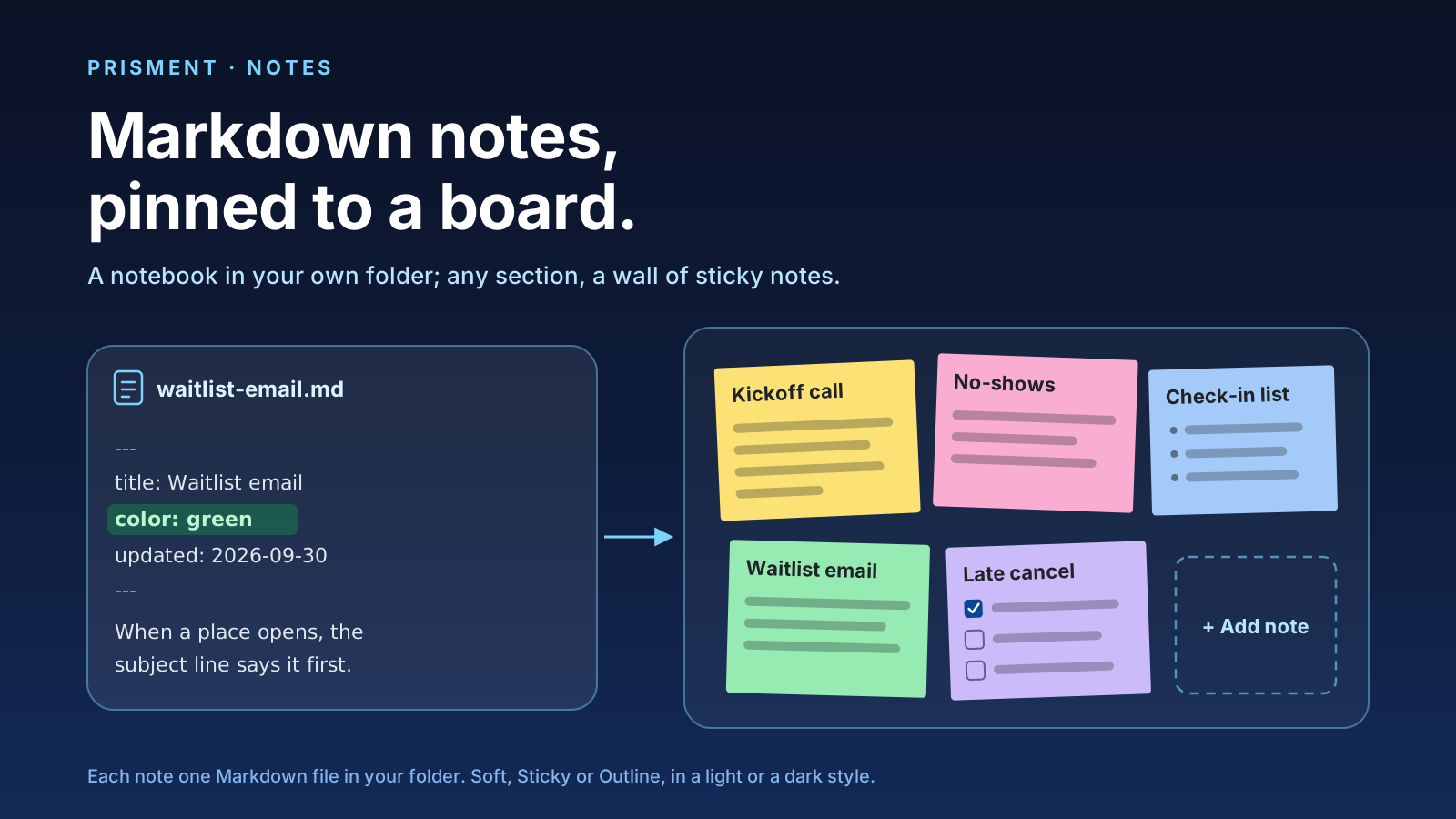
Notes in Prisment is a notebook of pages, each page one Markdown file in your own folder, and any section of it can be laid out as a board of coloured sticky notes. You write a page the way it reads, tick its to-dos where they stand, and find it again by its words. It is free, with no account and no server of ours in the path (how your documents are handled). The sample workspace opens with a notebook to try; plans have an article of their own.
1. What is a page, and where is it kept?
A page is a title and a text in Markdown, kept as one file in a folder for its section, inside a folder for its notebook. In a folder workspace the notebook sits in the hidden .prisment/notes/ folder of the folder you opened, or in another folder you name; a browser workspace keeps it in the browser. Git or a synced drive carries it if you choose, and since Prisment makes no backup of its own, that is also where a copy comes from.
Notes stand on their own: nothing is read out of your documents, and a page's to-dos are your to-do list.
2. How do you write one?
Click and type: a page is written as it reads, in the same editor as your documents, and saved a moment after you stop. There is no Save button and no Markdown on screen. What you type in Markdown becomes what it stands for: # and a space starts a heading, - a list, [ ] a to-do, and **bold** turns bold as you close it. The bar under the title has the rest, from a checkbox to a table, and Undo steps back page by page.
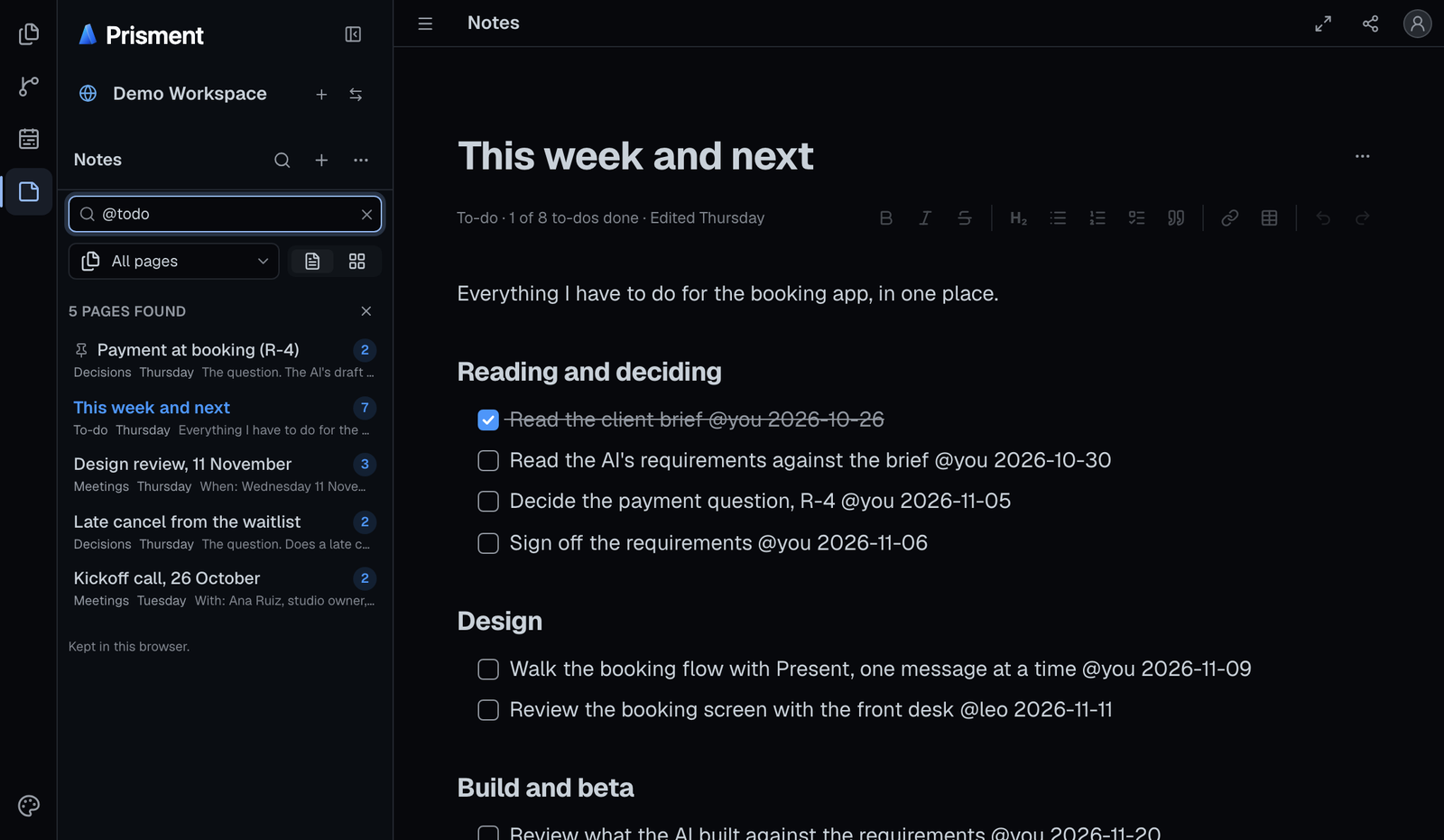
A to-do can carry a name and a day, as in - [ ] Confirm the date @maya 2026-11-05, so the file reads the same in GitHub or any editor. Pin a page to the top of its section, move it to another, or delete it with Undo.
3. How does a section become a board of sticky notes?
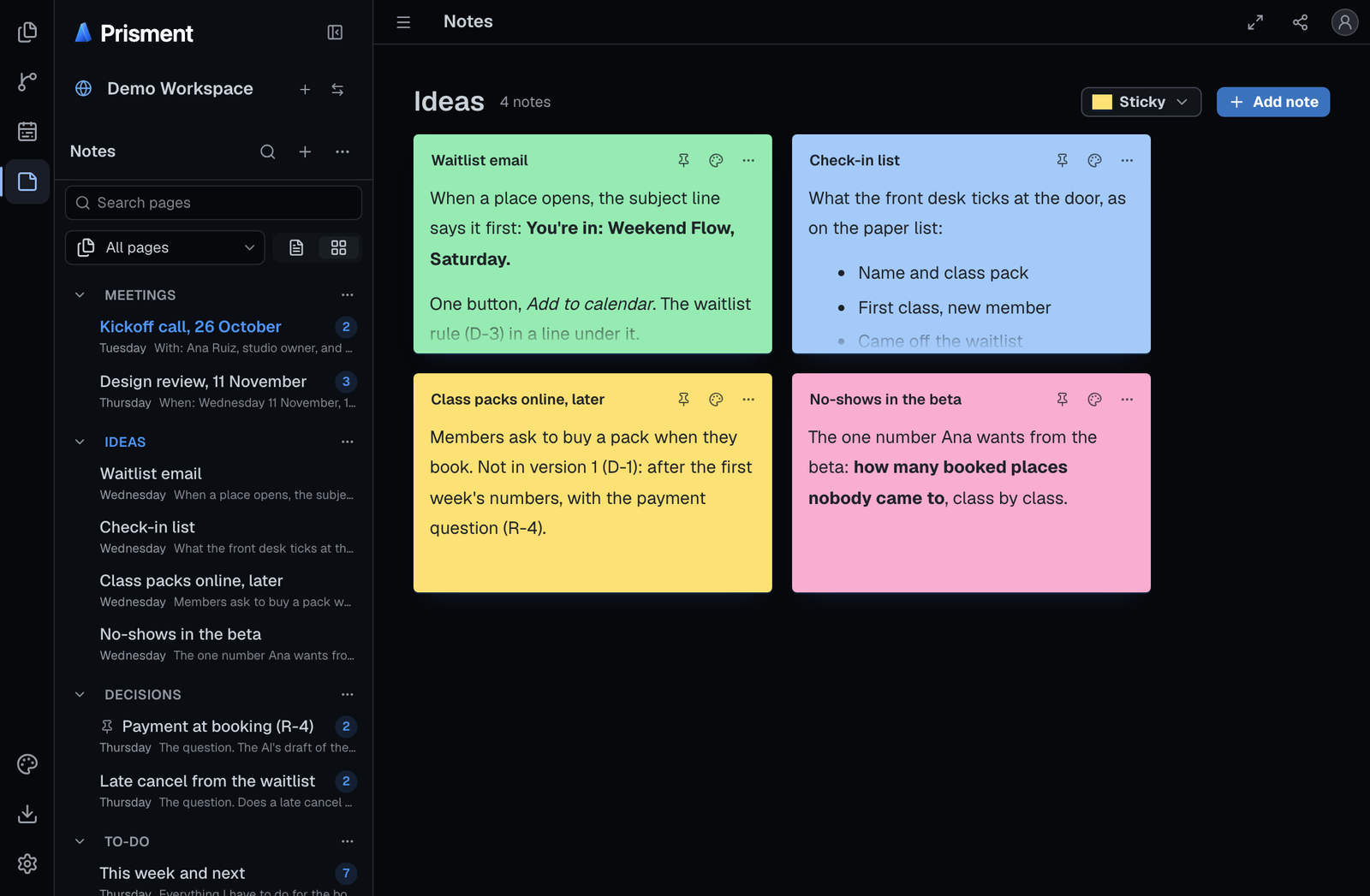
Choose Board as the view, and every section shows its pages as coloured cards on a wall you can add to, write on and rearrange. A card is still the page, one Markdown file, drawn as the page is: tables, callouts and diagrams included.
- Press Notes on the activity bar and choose Board, beside the filter above the sections.
- Choose a section in the sidebar: its pages are its cards.
- Press Add note for a new card, its title ready to type, and click its text to write it in place.
- Drag a card by its header anywhere on the board, and size it by its bottom-right corner.
- Give it a colour, yellow, pink, blue, green or purple, from the palette at its top right.
Without a mouse, Move or size with keys in a card's ⋯ lifts it for the arrow keys. On a phone the board is one column, and a card moves by name from the same menu.
4. Which card style suits a light or a dark theme?
Three styles draw the same cards, and each keeps every word readable in every document style, light or dark.
| Style | A card is | Its colour is |
|---|---|---|
| Sticky, the default | paper, in dark ink even in a dark theme | the whole note; a note with none is yellow |
| Soft | raised a step off the board | a wash of the card and its edge |
| Outline | a line on the board's own ground | the line, over a breath of its hue |
A style picked on a board is that workspace's own, and Settings › Notes sets the default for every workspace. Styles are kept on this computer and change no file.
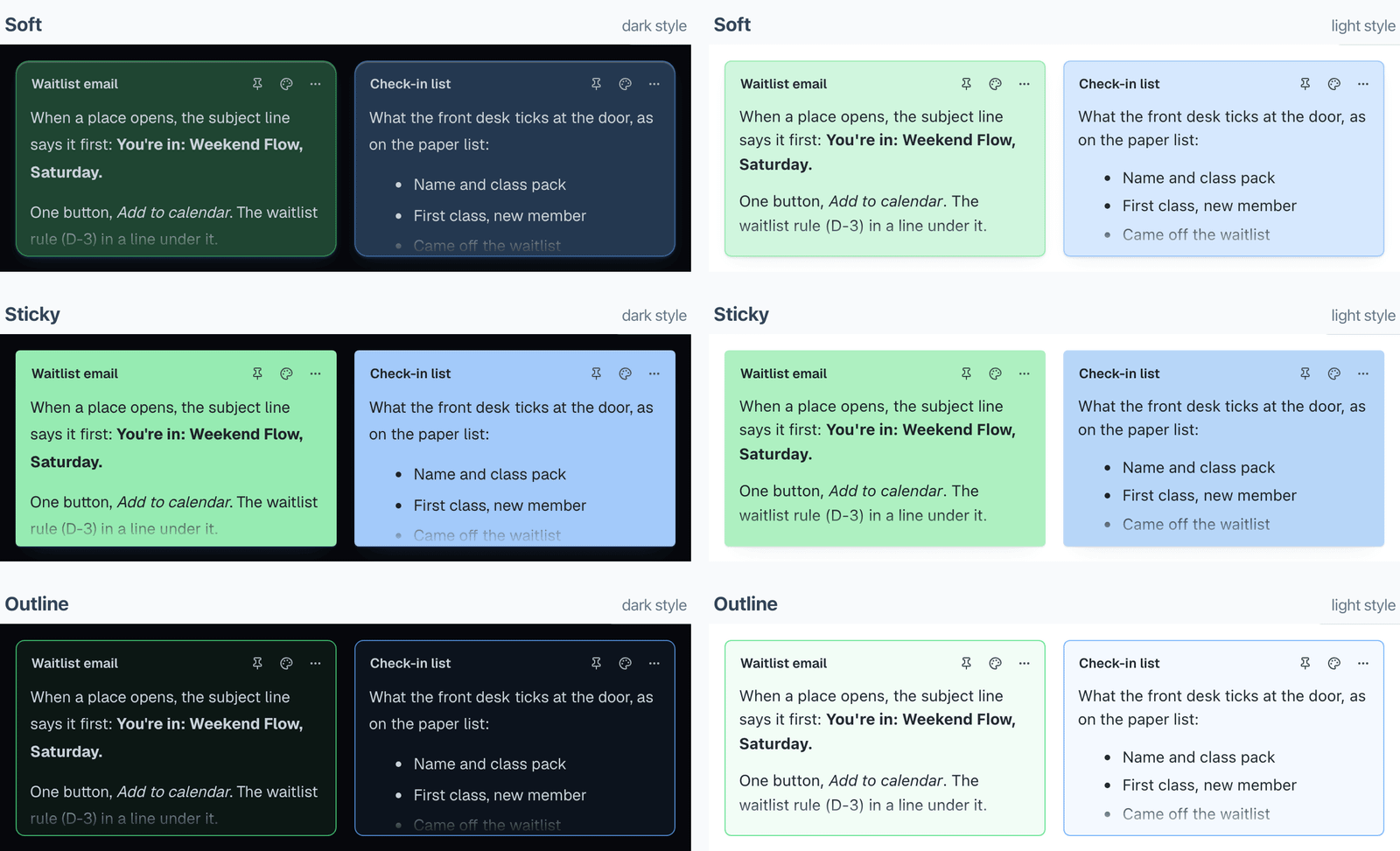
We checked every colour in every style on 30 October 2026, and not all of it read. On a sticky note in a dark style, a table's header row, a folded section and a diagram's labels came out dark on dark; on coloured Soft cards, links in a teal accent nearly vanished. Now a table, a folded section or a callout on a sticky note is paper and ink, a diagram keeps your style's own colours, and a coloured card mixes its links and quieter words so every word meets the contrast the web's accessibility guidelines ask for (4.5:1, WCAG AA). A test measures every colour in every style, so it cannot slip back unnoticed.
5. How do you find a page again?
Type in Search pages: it matches every word in any order, ignores capitals and accents, and understands a few searches of its own.
| Type | To find |
|---|---|
"call the venue" |
the words together, in that order |
-draft |
the pages without the word |
venue OR hall |
either one |
@todo or @done |
a to-do still open, or to-dos all ticked |
@pinned, @today, @last7days |
pinned, changed today, or in the last 7 days |
@title venue |
the word in titles only |
The filters above the sections, All pages, To-do, Today and Pinned, gather their pages into one list and narrow the board too. Quick Open (Cmd+P, or Ctrl+P) jumps to any page in any notebook.
6. What is in the file?
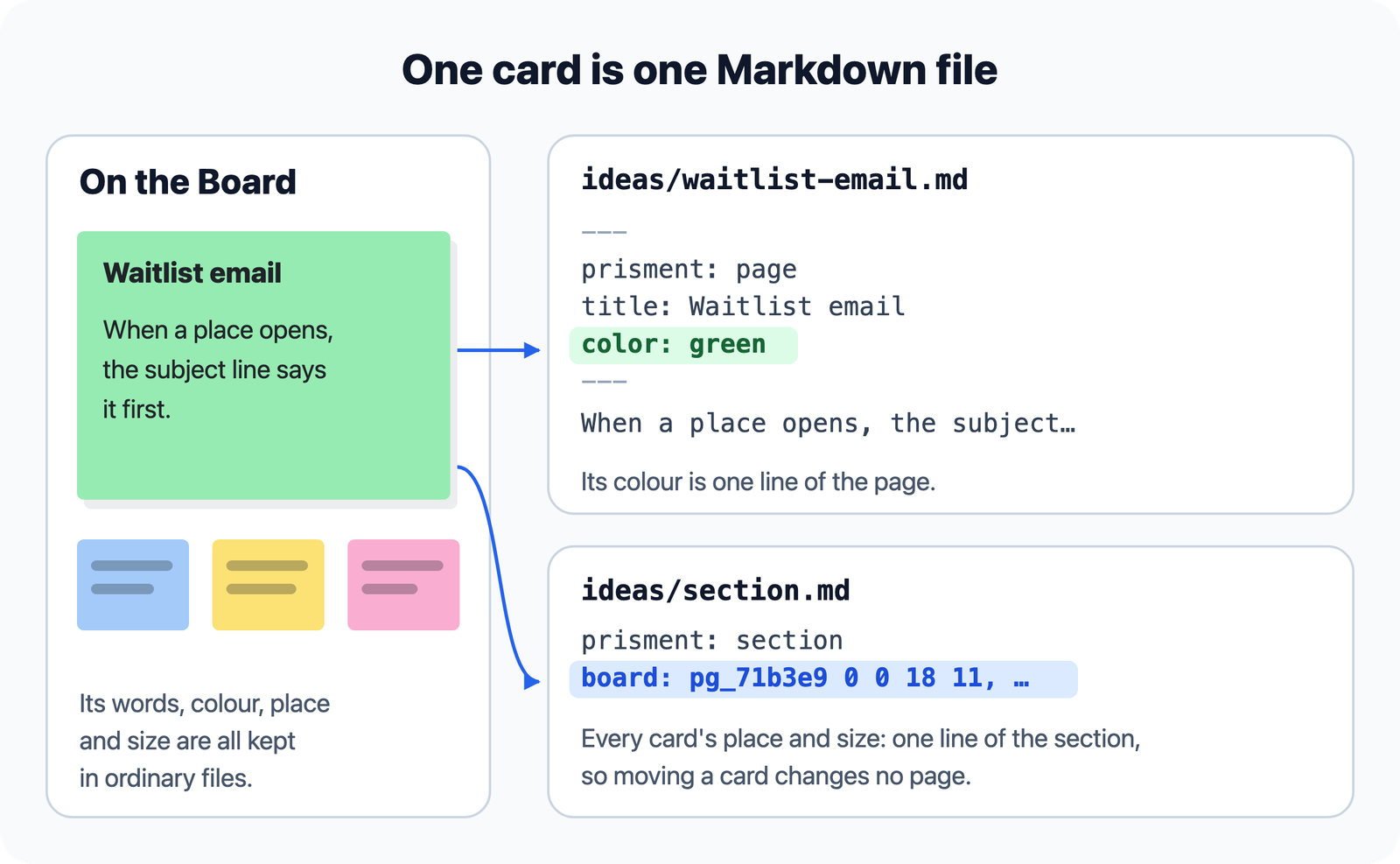
The page's own lines: its title and dates at the top, then its text; a colour is a color: line, and where a card sits is one line of its section's file. Moving a card writes no page.
---
prisment: page
version: 1
title: Waitlist email
created: 2026-09-29T11:00:00Z
updated: 2026-09-30T17:20:00Z
color: green
---

When a place opens, the subject line says it first.
You, a colleague and an AI agent can edit the same files. Before it saves, Prisment reads the page again: if it changed since you opened it, your change is not saved, and the page shows what is there now.
7. Where does it stop?
Prisment keeps notes and shows them; it adds no sync service, no reminders and no live co-editing. A change from someone else arrives when Git or your drive delivers it, and a notebook can be kept only for you, on this computer, while the rest of the workspace is shared. Every option is in the guide, Plans and notes. Free, no account: open the workspace and start with the sample notebook.
Frequently asked questions
Is a note in Prisment a Markdown file?
Yes. Each page is one Markdown file, with its title, dates and, if it has one, its colour in the front matter at the top, kept in a folder for its section inside a folder for its notebook. GitHub and any editor show it as an ordinary Markdown page.
Where does Prisment keep my notes?
In a folder workspace, in the hidden .prisment/notes/ folder of the folder you opened, or in another folder you name; in a browser workspace, in the browser. Prisment makes no backup of its own, so keep the notes in a folder a cloud drive syncs or in a Git repository you push.
Can I use my notes as sticky notes on a board?
Yes. With Board as the view, a section shows its pages as coloured cards you can add, write on, drag anywhere and resize. A card's colour is a line in its page and its place on the board is a line in the section's own file, so moving a card changes no page.
Do the sticky notes work in dark mode?
Yes. The Soft, Sticky and Outline card styles each keep a card's words readable in every document style, light or dark. Sticky notes stay paper written in dark ink in a dark theme; a table or a callout on one is drawn in ink on the paper, while code and diagrams keep the style's own colours.
How do I find the notes that still have open to-dos?
Type @todo in Search pages, or choose the To-do filter above the sections. Search also takes "a phrase", -word to leave pages out, OR between two words, and @done, @pinned, @today and @last7days, and Cmd+P or Ctrl+P opens Quick Open to jump to any page in any notebook.
Do notes need an account or a server?
No. Notes are written to your own folder or your browser, and Prisment has no cloud storage or accounts for them. That is about your documents; the hosted website separately uses aggregate analytics, which the privacy policy describes.