Plan the Work in Markdown: Gantt, Board and Notes
A Gantt chart you make yourself, kept as one Markdown file, with a Table, Board, Calendar and Overview of the same plan, and notes beside it. No server, no account.

Plans is a Gantt chart you make yourself, kept as one Markdown file in your own folder, and Notes keeps the options you weighed and your to-dos beside it. They are for the moment between an AI's design and the build: once you have talked the design through you know what could be built, and you decide which solution, in what order and by when. Both are ordinary files, free, with no account and no server. The sample workspace opens with a plan and a notebook to try, and approving the plan before the AI builds is the step after this one.
1. What does one plan hold, and how do you look at it?
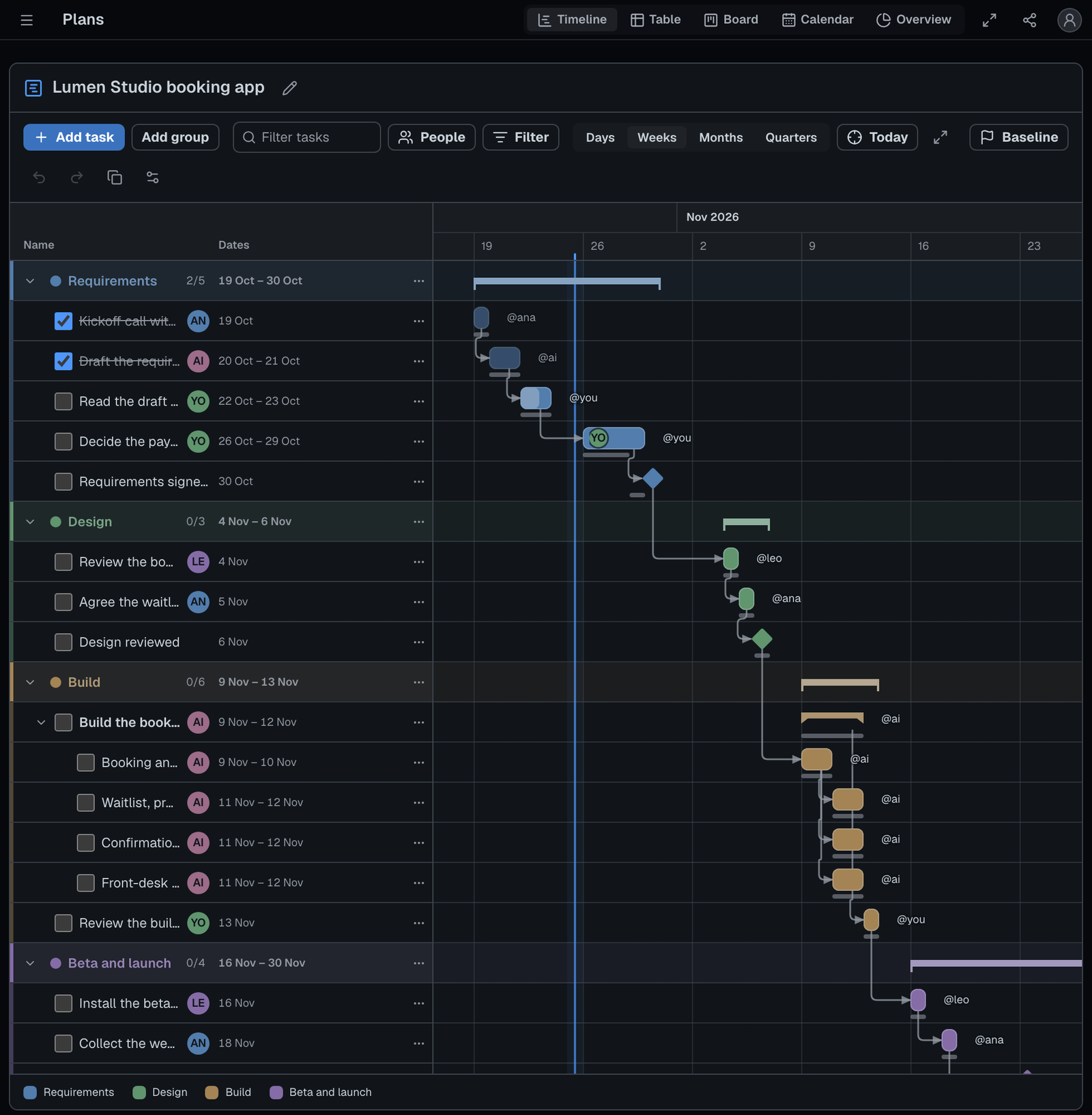
One plan is groups of tasks with owners, dates and links, saved as <name>.plan.md, and every view shows the same tasks. Choose the view that answers your question; a filter on the words, the people or the status stays as you move between them.
| View | What it answers |
|---|---|
| Timeline | When does each task run, and what waits on what? Bars, arrows, milestones as diamonds, a line for today |
| Table | Who owns what, and where does each stand? A spreadsheet you edit in place, by group, status or owner |
| Board | What is to do, in progress, blocked or done? A card for each task; drag it to change its status |
| Calendar | What falls on which day? The month, each task on every day it spans; drag one to move it |
| Overview | How far along are we, and what is late? Counts, who has what, what is due in seven days, the next milestones |
2. How do you make a plan?
Press Plans, start a plan, give each task an owner and dates, and link the tasks that wait on each other.
- Start a plan. Press Plans in the activity bar, then +.
- Choose where to begin. Project plan, to start from gives three groups of linked tasks dated from next Monday; Blank plan gives you nothing.
- Fill in the tasks. Set an owner (Me comes first), dates and a group in any view.
- Link the ones that wait. On the Timeline, drag the small circle past a bar's end onto another bar, so that task starts after this one finishes.
- Set a baseline once the dates are agreed.
Every change is saved at once and Undo steps back through it. If a colleague or an agent changes other tasks meanwhile, both changes are kept.
3. What do the baseline and the critical path show?
A baseline keeps the dates you agreed as thin bars under the current ones, so a slip shows at a glance, and the critical path rings the tasks whose delay delays the end. When a task ends later, the tasks waiting on it move later by as much as they must, and nothing is ever moved earlier.
4. Where do the notes and to-dos go?
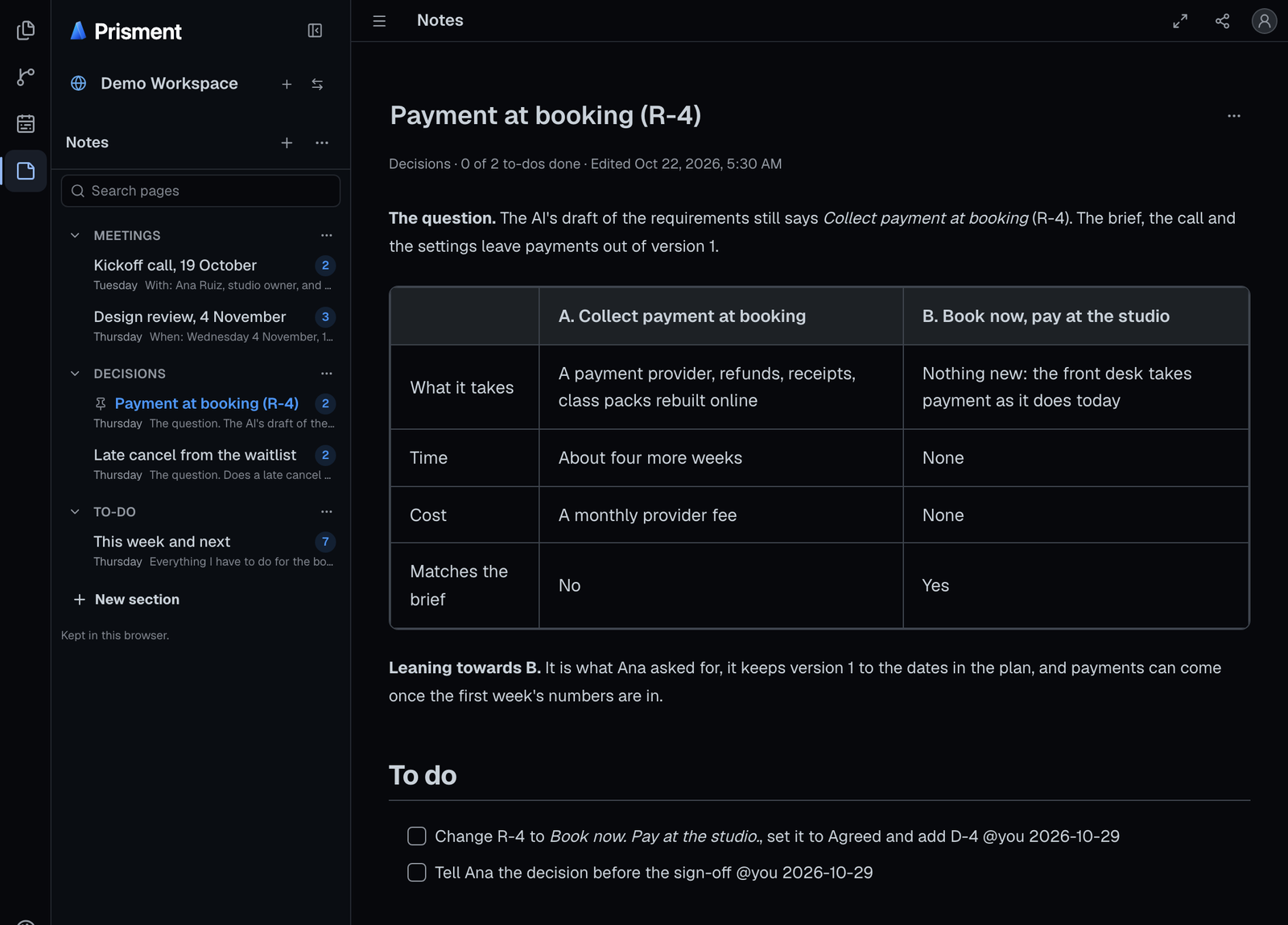
Notes keeps notebooks of sections and pages, and a page's to-dos are the same task boxes GitHub shows, with an owner and a day. Keep the options you weighed and the call you made on a page, as the sample's payment decision does: pin it to the top of its section, tick a to-do right on it and search the notebook. A to-do is a line such as - [ ] Confirm the date @maya 2026-11-05, so the file reads the same anywhere. Each page is one Markdown file, in a folder for its section. A section can also be a board of sticky notes: Notes has an article of its own.
5. Where do the files live, and what can leave them?
In ordinary files in the workspace's hidden .prisment/ folder, in another folder you name, or in your browser, carried by Git or a synced drive if you choose, and a plan leaves as CSV, Microsoft Project XML or a Mermaid Gantt. Prisment adds no server, no account and no share link for them (how your documents are handled), and stopping using it loses nothing.
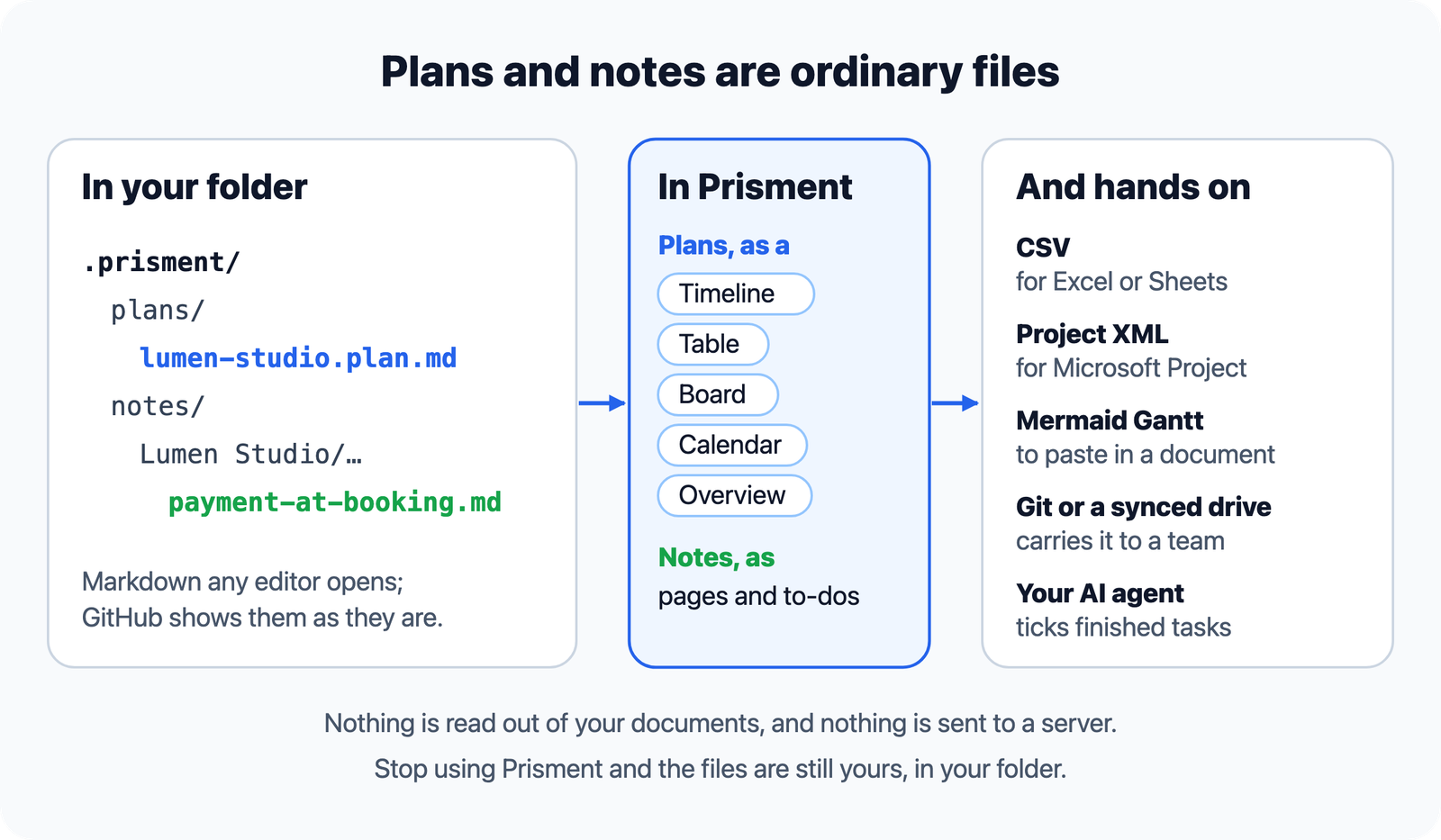
With the review skill installed, your AI agent can ask for the plan: it gets every open task with its owner, dates and line, and ticks each one when it is done, and you see the ticks in Plans.
6. Where does this stop?
Prisment does not remind you, schedule anything or run while it is closed, and it reads no task out of your documents. A checklist in a document stays that document's words; a plan is made in Plans. A change arrives when Git or your drive delivers it, with no live co-editing: if two computers change the same task, one change is not saved and the plan is read again, and a sync service's second copy opens beside the original with Open both. Every option is in the guide, Plans and notes. When the plan is agreed, approve it before the AI builds: the approval names the exact versions you read, and an AI tool can never give it. Free, no account: open the workspace and start with the booking-app sample.
Frequently asked questions
What is a Gantt chart in Markdown?
A plan kept as a Markdown checklist file, with each task a task item carrying its owner and dates, from which the chart is drawn. In Prisment a plan is a <name>.plan.md file that GitHub and any editor show as an ordinary checklist, while Prisment draws it as a Timeline, a Table, a Board, a Calendar and an Overview.
Where does Prisment keep plans and notes?
In ordinary files. A plan is a .plan.md Markdown file and a notebook is a folder of Markdown pages, kept in the hidden .prisment folder of the workspace's home, in another folder you name, or in your browser when the workspace has no folder. Git or a synced folder carries them if you choose.
Can I export a plan to Excel or Microsoft Project?
Yes. A plan's menu exports it as CSV for Excel, Numbers or Google Sheets, or as Microsoft Project XML for Microsoft Project, ProjectLibre or GanttProject, and a new plan can be imported from either file. Copy as Mermaid puts it on the clipboard as a Mermaid Gantt chart.
Can an AI agent read or tick the plan?
Yes, with the review skill installed. An agent can ask for the plan and gets every open task with its owner, dates, group and the file and line it is on, and it ticks a task on its line when it is done. It is told never to reword, re-date or remove a task, and you see its ticks in Plans as soon as the file changes.
Does Prisment remind me of deadlines or schedule work?
No. It does not remind you, schedule anything or run while it is closed. A task that is not done once its last day has passed is marked Late in every view, and the critical path shows which delays move the end date.
Do plans and notes need an account or a server?
No. They are written to the workspace's home on your computer or in your browser, and Prisment has no cloud storage or accounts for them. That is about your documents; the hosted website separately uses aggregate analytics, which the privacy policy describes.