What Actually Happens to Your Document: The Case for a Client-Side Markdown Editor
Where browser Markdown tools send your text, why Prisment has nowhere to send it, how to verify that yourself in five minutes — and exactly what we do measure.
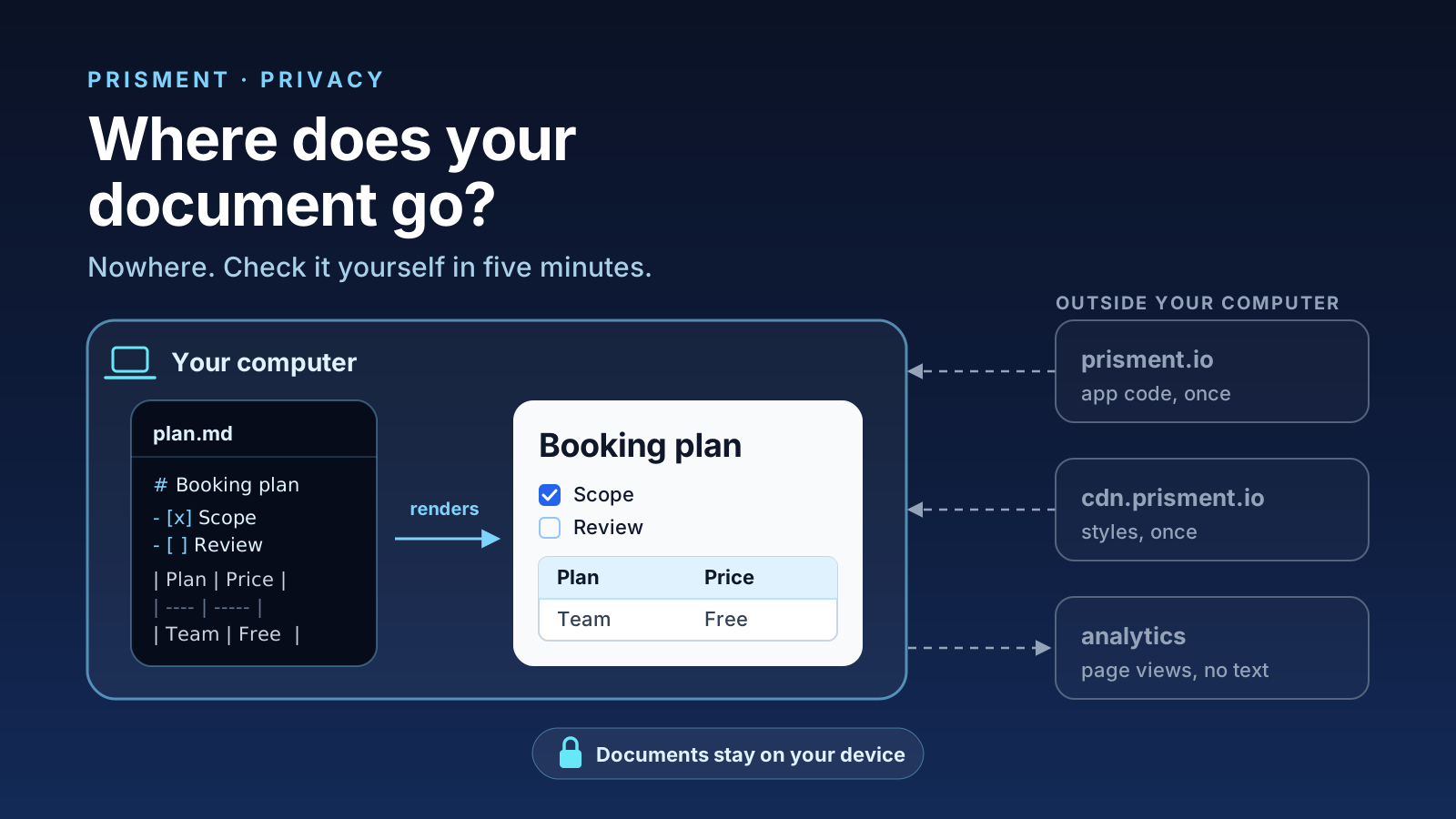
Short answer: in a client-side editor, your document never crosses the network at all. Parsing, rendering and saving happen inside the browser tab, and the file stays on your disk. In a server-rendered editor every render is an upload: your text reaches the vendor before it reaches your screen, and can persist in logs, caches and backups long after you close the tab. Prisment is free to use today and needs no account; the privacy policy says the same things this article does.
1. Which kind of browser tool is it?
Every web-based Markdown tool is one of three architectures, and only one keeps your text off the network. They look identical from outside, so the question that separates them is not where is it rendered but what leaves the machine, and when.
| Server-rendered | Client-rendered, cloud-synced | Fully client-side | |
|---|---|---|---|
| Parsing happens in | The vendor's backend | Your browser | Your browser |
| Does your text cross the network? | On every render | On every sync | Never |
| The document at rest | Vendor's storage | Vendor's storage | Your disk only |
| Account required | Usually | Always | No |
| A vendor breach exposes | Your documents | Your documents | Nothing of yours |
| Works with no network | No | Read-only, at best | Yes |
2. Why does Prisment have nowhere to put your document?
Prisment compiles to static files — there is no application server, no database and no API route, so no endpoint exists that could accept a document. The strongest privacy guarantee is not a policy; it is an architecture in which the unwanted thing cannot be done.
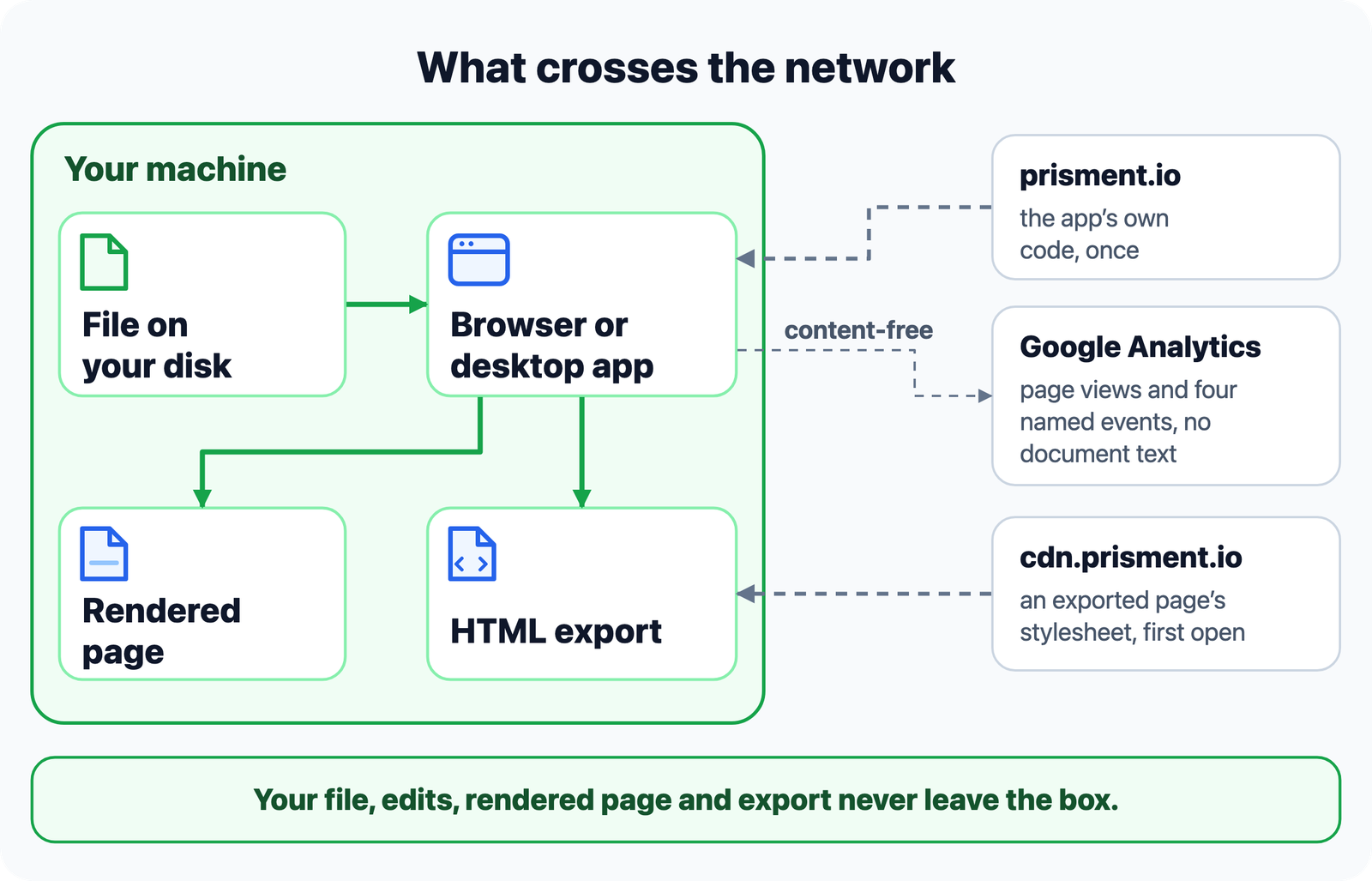
Three things cross the boundary, and none is your content: the app's own code coming down, an exported page fetching its stylesheet, and a few content-free measurements going up. Your file, your edits, your rendered page and your export never leave the box. A folder you mount is read and written in place through the browser's File System Access API, with no cloud proxy and no staged copy (Local disk sync).
3. How do you verify it in five minutes?
Do not take the claim on trust: watch the network while you work, then pull the connection and keep working. Both halves run in your own browser.
- Open the app and the developer tools. Open the workspace and press
F12, orCmd+Option+Ion macOS. - Clear the Network tab, so you are only reading traffic your own actions caused.
- Do the work you care about. Open a local file or drag one in, type into it, change the presentation style, and export it to HTML.
- Read the request list. You will see the app's files, the analytics tag on the hosted site — and a small named event when you export — and no request that contains your text.
- Run the offline test. Set throttling to Offline, or switch off Wi-Fi, and reload. The shell comes back from a service-worker cache and you can still open a file, edit it, render diagrams and save.
Step 5 is the more convincing half: a tool that renders on a server cannot pass it, and no policy copy changes that. The strongest version costs nothing — install the desktop build, disconnect the machine, and keep working.
4. What do we measure?
Aggregate usage, never document content: page views and four named events on the website, an anonymous daily signal in the desktop app, and nothing in an exported file. An article about privacy that lists only guarantees is marketing; here is the other half.
| Surface | What is reported | Never reported | Turn it off |
|---|---|---|---|
| prisment.io | Page views as origin + path (a query string or a heading fragment in the workspace is never sent); desktop_download, html_export, document_convert with its source and target format only, and winget_copy; conversion measurement for our own ads |
Document content, text, file names, folder paths | A content blocker, or open the site with ?prisment_analytics=off |
| Desktop app | An anonymous install signal and an at-most-daily active ping with OS, app version and country, against a random install identifier | Everything above; no advertising SDK ships in the desktop build | Help → Share Anonymous Usage Data |
| An exported HTML page | Nothing. It carries no identifiers and reports nothing back | Everything | Nothing to disable; it fetches its stylesheet from cdn.prisment.io on first open |
An exported page is not a fully offline bundle: the CDN request tells it a page was opened, not what the page says. For a recipient who must open it with no network contact at all, use the PDF Document export.
5. Why "zero document tracking", not "zero tracking"?
Because the hosted website uses Google Analytics for aggregate visitor counts, an unscoped privacy claim is false the moment a reader opens the Network tab. Earlier marketing copy said "zero tracking and zero cloud uploads". The documents were genuinely client-side, but the site loaded analytics, so we deleted the unqualified sentence, bound every guarantee to what can be verified, and added a test that fails the build if the copy ever promises "zero site tracking" while analytics is on. Checking the article against the code on 7 October 2026 found the same failure in smaller form — it said two named events where the site sends four — and it is corrected above.
6. Where does the guarantee stop?
Client-side rendering removes the vendor from your threat model; it does not remove your machine, your browser extensions, or what you do with the exported file.
- It protects against your document sitting in a third party's storage, logs or backups; a vendor breach exposing unpublished work; retention you cannot audit; and the plain accident of pasting an internal spec into a tool whose terms you never read.
- It does not protect against a compromised machine, a malicious browser extension (which can read any page's DOM), a shared or unlocked computer, or emailing an exported page to the wrong person.
Local-first shrinks the trust surface; it does not eliminate it. What you no longer have to trust is a vendor's retention policy and their promise to delete something you cannot verify was deleted.
7. Try it
Open the workspace, watch the Network tab, then pull the plug and keep working. The same property holds for converting Word, PDF and Excel files and for the local AI assistant, whose model runs on your own computer. Or download the desktop app.
Frequently asked questions
Is it safe to open a confidential document in a browser-based Markdown editor?
It depends entirely on where the rendering happens. A tool that renders on its server has to receive your text first, which means the document exists on someone else's infrastructure — in logs, in caches, in backups. A tool that renders in the browser never transmits it. Prisment is the second kind: parsing, syntax highlighting, KaTeX and Mermaid all execute inside your browser sandbox, and the document is never uploaded.
How can I verify that Prisment does not upload my documents?
Open your browser's developer tools, switch to the Network tab, then open a file, edit it and export it. No request carries your document; the traffic is the app's own static files and, on the hosted site, Google Analytics page views and a few named events that carry no content. Then set the Network tab to Offline and reload: the app still loads and renders, because there is no server round-trip between your file and the screen.
Does Prisment collect any analytics at all?
Yes, and never from your documents. The hosted website prisment.io runs Google Analytics for aggregate page views, four named events (a desktop download, an HTML export, a document conversion with its source and target format, and a copy of the winget command) and conversion measurement for our own ad campaigns; opening the site with ?prisment_analytics=off switches it off. The desktop app sends an anonymous install and daily-active signal and you can switch it off from the Help menu. No document content, text or file names, on any surface.
Can I use Prisment on a machine with no internet connection?
Yes, once the app has been loaded once. The web app is an installable PWA whose shell is cached by a service worker, and the desktop builds carry everything locally. Rendering, styling, diagrams, editing and disk sync have no network dependency. The exception is a standalone HTML export, which fetches its stylesheet and runtime from cdn.prisment.io the first time it is opened — for a copy that needs no network at all, use the PDF Document export.
Do I need an account to use Prisment, and does it cost anything?
No account and no sign-up. Every feature is free today on the web app and on the desktop builds, with no trial period and no recurring fee. The absence of an account follows from the architecture: with no server storing documents, there is nothing for an account to be attached to.